Standing Desks Alone Won't Fix Your Posture (And What Actually Works) because prolonged sitting compresses joints, restricts blood flow, and disrupts natural recovery cycles. The right ergonomic setup and movement breaks directly counteract these effects.
The Standing Desk Promise (And Why It Falls Short)
You finally did it. You invested in a standing desk. Maybe it’s a sleek electric model that glides up and down with the touch of a button. You’ve heard the warnings: “Sitting is the new smoking.” So you stand. For hours. You feel virtuous, productive, and ready to conquer your to-do list.
But then, a few weeks in, something unexpected happens. Your lower back starts aching in a new way. Your knees feel stiff. Your shoulders are creeping up toward your ears. And you find yourself slumping forward—even while standing.
If this sounds familiar, you’re not alone. A 2018 study published in Ergonomics found that while standing desks can reduce sedentary time, they don’t automatically improve posture—and in some cases, they introduce new musculoskeletal discomforts. The truth is, standing desks alone won’t fix your posture. In fact, they can sometimes make things worse if you’re standing incorrectly.
Let’s explore why, and more importantly, what actually works.
The Hidden Problem: Static Standing Is Still Static
Here’s the uncomfortable truth: Your body wasn’t designed to be static—whether sitting or standing. A 2021 systematic review in Applied Ergonomics found that prolonged standing (over 2 hours) is associated with increased risk of lower back pain, varicose veins, and overall fatigue. The problem isn’t standing itself; it’s static standing—holding one position without movement.
When you stand still for extended periods, your blood pools in your lower extremities, your hip flexors tighten, and your lumbar spine loses its natural curve. Many people unconsciously compensate by locking their knees, tilting their pelvis forward (anterior pelvic tilt), or shifting weight to one leg. These compensations create a cascade of issues:
- Lower back strain from excessive lumbar lordosis
- Neck and shoulder tension from hunching forward to look at a screen
- Knee and hip discomfort from uneven weight distribution
- Foot and ankle pain from prolonged pressure on hard surfaces
A 2017 study from the University of Waterloo found that even among standing desk users, 73% reported some form of musculoskeletal discomfort. The takeaway? Standing isn’t a magic bullet—it’s just a different position. And any position held too long becomes a problem.
Your Standing Posture Might Be Worse Than Your Sitting Posture
Let’s get specific. When you sit, you might slouch. But when you stand without proper setup, you might adopt what ergonomists call the “standing slouch”—a forward head posture with rounded shoulders and a tucked pelvis. This position actually increases disc pressure in the lower back more than sitting with good support.
Dr. Alan Hedge, a professor of ergonomics at Cornell University, has been studying workplace posture for decades. He notes that the ideal standing posture requires your ears, shoulders, hips, knees, and ankles to align vertically. But achieving this alignment is surprisingly difficult without the right setup.
Common standing posture mistakes include:
- Looking down at your monitor (causing forward head posture and neck strain)
- Resting your wrists on a hard desk edge (compressing nerves and tendons)
- Standing on a hard floor without support (leading to foot fatigue and pelvic misalignment)
- Using a desk that’s too high or too low (forcing awkward shoulder and arm angles)
In other words, your standing desk setup matters just as much—if not more—than your sitting setup. Without proper accessories and awareness, you’re just trading one set of problems for another.
What Actually Works: The Movement-First Approach
The research is clear: the best posture is your next posture. A landmark study from the University of Queensland found that breaking up sedentary time with brief, frequent movement (as short as 1-2 minutes every 30 minutes) significantly reduces metabolic and musculoskeletal risks. The key is dynamic posture, not static perfection.
Here’s what actually works, backed by evidence:
1. Optimize Your Standing Setup (Don’t Just Stand)
A standing desk is a tool, not a solution. To make it work for your body, you need the right ergonomic foundation:
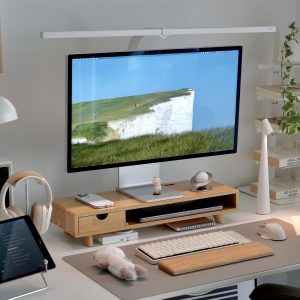
- Monitor height: The top of your screen should be at or just below eye level. You shouldn’t have to tilt your head up or down. If your desk doesn’t adjust high enough, a monitor stand can bridge the gap and prevent forward head posture.
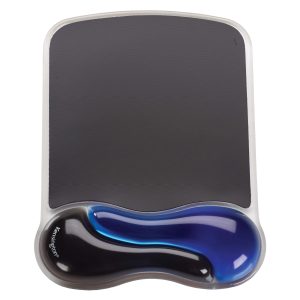
- Keyboard and mouse position: Your elbows should form a 90-degree angle, with wrists straight and neutral. A wrist rest can help maintain this alignment and reduce pressure on the carpal tunnel.
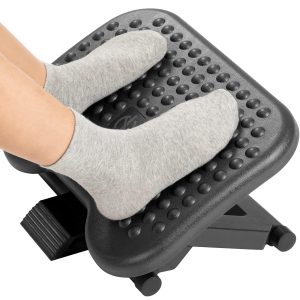
- Foot support: Standing on concrete or hardwood for hours is a recipe for foot pain and pelvic instability. An anti-fatigue mat is essential, and a foot rest allows you to shift weight and keep your pelvis neutral.
- Lumbar support: Even while standing, your lower back needs support. A lumbar support cushion on a stool or leaning surface can help maintain your spine’s natural curve during breaks.
2. Follow the 30-30-30 Rule
Instead of sitting all day or standing all day, aim for a rhythm: 30 minutes sitting (with good support), 30 minutes standing (with proper setup), and 30 seconds of movement (walking, stretching, or shifting weight). This cycle prevents any single position from becoming problematic.
A 2020 study in the International Journal of Environmental Research and Public Health found that workers who alternated between sitting and standing every 30 minutes reported 45% less discomfort than those who sat or stood for longer stretches.
3. Strengthen Your Postural Muscles
No desk setup can compensate for weak postural muscles. Your core, glutes, and upper back muscles are responsible for keeping you upright without effort. When these muscles are weak, you’ll default to slouching—whether sitting or standing.
Simple desk-friendly exercises include:
- Wall angels: Stand against a wall with your arms at 90 degrees and slide them up and down. This opens the chest and strengthens the upper back.
- Glute squeezes: While standing, squeeze your glutes for 5 seconds, then release. This activates the muscles that stabilize your pelvis.
- Chin tucks: Pull your chin straight back (like making a double chin) to strengthen the deep neck flexors and reduce forward head posture.
Do these for 1-2 minutes during your standing intervals, and you’ll build the muscular support your posture needs.
4. Use Micro-Breaks Strategically
Research from the University of Southern California shows that micro-breaks—short pauses of 30-60 seconds—can significantly reduce muscle fatigue and discomfort. The key is to use them intentionally:
- Shift your weight from one foot to the other
- Roll your shoulders back and down
- Gently tilt your head side to side
- Shake out your hands and wrists
Set a timer every 20-30 minutes to remind yourself. Over time, these micro-movements become automatic, preventing the stiffness that leads to poor posture.
The Missing Piece: Proper Ergonomic Accessories
Your standing desk is only as good as the accessories that support your body’s natural alignment. Here’s where many desk workers go wrong: they buy a standing desk but skip the ergonomic add-ons that make standing sustainable.
Monitor Stands: The Foundation of Neutral Neck Posture
If your monitor is too low, you’ll tilt your head forward—even while standing. This adds up to 30 pounds of pressure on your cervical spine for every inch your head moves forward. A monitor stand lifts your screen to eye level, keeping your neck in a neutral position. Look for one that’s adjustable and stable enough to hold your monitor securely.
Wrist Rests: Protecting Your Wrists in Any Position
Whether sitting or standing, your wrists should remain straight—not bent up, down, or to the side. A wrist rest provides a cushioned surface that supports your wrists while typing, reducing pressure on the median nerve. This is especially important when standing, as your arm angle changes with desk height.
Foot Rests: Keeping Your Pelvis Neutral
When you stand for long periods, it’s natural to shift your weight. But if you don’t have a way to elevate one foot slightly, you’ll likely tilt your pelvis forward or back. A foot rest allows you to alternate foot positions, keeping your pelvis neutral and reducing lower back strain. It’s a small addition with outsized benefits.
Lumbar Support: Your Back’s Best Friend (Even When Standing)
Many people think lumbar support is only for sitting. But even when standing, your lower back benefits from occasional support. A lumbar support cushion on a high stool or counter allows you to lean back periodically, giving your spine a break from holding itself upright. This micro-break for your back can prevent the fatigue that leads to slouching.
Real-World Case Study: The 30-Day Posture Reset
Consider the experience of Sarah, a marketing manager who switched to a standing desk thinking it would solve her chronic back pain. After two weeks, she felt worse. Her lower back ached, and her feet were sore by midday.
She made three changes:
- She raised her monitor with a monitor stand so she no longer looked down.
- She added a wrist rest and adjusted her keyboard height.
- She started alternating between sitting and standing every 30 minutes, using a foot rest when standing and a lumbar support cushion when sitting.
Within a week, her back pain dropped by 60%. After a month, she reported feeling more energetic and focused. The standing desk alone didn’t fix her posture—but the complete ergonomic system did.
Your Action Plan: From Static Standing to Dynamic Wellness
If you’re ready to move beyond the standing desk hype and build a posture that actually supports you, here’s your step-by-step plan:
- Audit your setup: Take a photo of yourself at your desk (sitting and standing). Check your ear-shoulder-hip alignment. If your head is forward or your shoulders are rounded, adjust your monitor height and desk position.
- Invest in ergonomic accessories: A monitor stand, wrist rest, foot rest, and lumbar support aren’t luxuries—they’re essential tools for sustainable posture.
- Set a movement timer: Use an app or smartwatch to remind you to change positions every 30 minutes. Include 1-2 minutes of movement (walking, stretching, or the exercises above).
- Strengthen your foundation: Add 5 minutes of postural exercises to your daily routine. Your core, glutes, and upper back will thank you.
- Listen to your body: Pain is feedback. If something hurts, adjust your setup or take a break. No desk is worth chronic discomfort.
The Bottom Line
Standing desks are a valuable tool in the fight against sedentary work—but they’re not a cure-all. Without proper setup, movement, and ergonomic support, standing can introduce new problems. The real solution is a dynamic, movement-first approach that combines alternating positions, ergonomic accessories, and postural strength.
Your body wasn’t designed to be still. Whether sitting or standing, the goal isn’t to find the “perfect” posture—it’s to keep moving. So stand up, sit down, stretch, shift, and breathe. Your spine will thank you.
And if you need a little help along the way, the right accessories—like a monitor stand, wrist rest, foot rest, or lumbar support—can make all the difference between surviving your workday and thriving through it.
🪑 Fix Your Desk Setup in 5 Minutes
Download the free Ergonomic Setup Checklist — 15 steps to reduce pain and work comfortably.
Get Free Checklist →