For desk workers, understanding Night Shift Desk Setup is essential for maintaining comfort and productivity throughout the workday. Here is what the research shows and how to apply it.
Night shift workers and late-night coders face a unique challenge: your body’s natural circadian rhythm is fighting against your work schedule. The result? Higher rates of musculoskeletal pain, digital eye strain, and metabolic disruption. But here’s the good news: with the right ergonomic setup, you can protect your body and improve your performance during those late hours. This guide covers seven research-backed ergonomic hacks specifically designed for night shift desk setups.
Slowvana has studied the recovery needs of desk workers for years, and night workers have distinct requirements. Your workspace needs to compensate for low-light conditions, reduced movement, and the body’s natural decline in core temperature and alertness. Let’s fix that.
1. Prioritize Blue Light Management at Your Desk
The most critical ergonomic hack for night shift workers isn’t about your chair — it’s about your screen. Blue light exposure at night suppresses melatonin production by up to 50%, according to Harvard research. This not only makes it harder to sleep after your shift but also increases eye strain during work.
The fix: Enable your device’s night mode or use blue-light filtering software (like f.lux or Windows Night Light) set to the warmest color temperature by 8 PM. But hardware matters too. A monitor stand that raises your screen to eye level reduces glare from overhead lights and helps you maintain a neutral neck position. Slowvana’s Bamboo Monitor Stand lifts your screen to the ideal height (top of the screen at or just below eye level), reducing forward head posture that’s common when you’re tired and leaning into the screen.
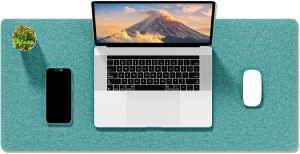
Pro tip: Avoid white or blue-toned desk accessories. Darker, warmer surfaces reduce visual contrast and eye fatigue. A Large Felt Desk Mat in charcoal or natural wool tones absorbs light rather than reflecting it, calming your visual field during late-night work sessions.
2. Create a “Circadian-Aligned” Desk Layout
Your body temperature drops during the night shift, which reduces blood flow to your extremities and increases stiffness. A standard 9-to-5 desk setup doesn’t account for this. Night workers need a desk layout that promotes micro-movement and warmth.
The hack: Position your keyboard and mouse slightly closer to your body than you would during the day. This reduces the reach distance and keeps your shoulders in a more relaxed position. Combine this with a Gel Wrist Rest to support your wrists during typing — cold hands are more prone to repetitive strain injuries because tendons become less pliable.
Keep a secondary monitor or laptop at a 45-degree angle for reference materials. This encourages you to turn your whole body (not just your neck) when switching focus, which keeps your spine mobile.
3. The 20-8-2 Rule for Night Shifts
The classic 20-20-20 rule (look 20 feet away for 20 seconds every 20 minutes) is good for eye strain, but night workers need a more robust movement protocol. Research from the National Institute for Occupational Safety and Health (NIOSH) shows that night shift workers have a 30% higher risk of lower back pain due to prolonged static sitting.
Introducing the 20-8-2 rule:
- 20 minutes of focused work at your desk
- 8 minutes of standing or walking (even just around your desk)
- 2 minutes of targeted stretches (neck rotations, shoulder rolls, wrist flexor stretches)
This cadence keeps your blood flowing, reduces stiffness, and prevents the metabolic slowdown that comes from sitting for hours at night. Set a timer on your phone — don’t rely on memory, because your tired brain will skip breaks.
4. Optimize Your Chair and Foot Position
When you’re tired, your posture collapses. You slouch, your pelvis tucks under, and your lower back rounds. This puts enormous pressure on your lumbar discs. A standard office chair often lacks the support needed for 8+ hours of night work.
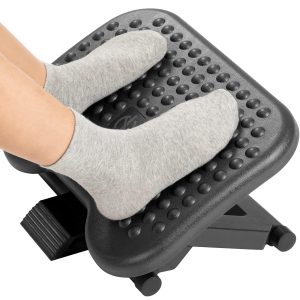
The fix: Ensure your feet are flat on the floor or on a footrest. When your feet dangle, your hamstrings pull on your pelvis, causing lower back strain. Your knees should be at a 90-degree angle, with your hips slightly higher than your knees (about 100-110 degrees).
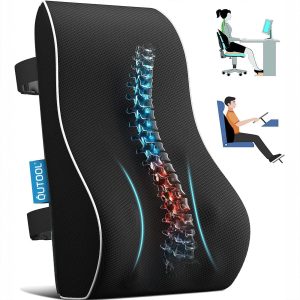
If your chair lacks lumbar support, use a rolled towel or a small cushion. But the most effective solution is a supportive desk setup that encourages upright posture. A Bamboo Laptop Stand raises your laptop screen to eye level, which naturally pulls your shoulders back and opens your chest — counteracting the forward slump that night workers often fall into.
5. Use Strategic Lighting, Not Just a Desk Lamp
Night shift workers often make the mistake of using bright overhead lights to stay awake. This backfires: bright white light suppresses melatonin but also creates harsh shadows and glare on your screen, increasing eye strain.
The better approach: Use layered lighting.
- Ambient light: A warm, dimmable floor lamp behind your monitor (not overhead). Set to 30-40% brightness.
- Task light: A small, directed light for reading documents, angled away from your screen.
- Screen light: Your monitor brightness should match the ambient light level — not be the brightest thing in the room.
This reduces the contrast ratio between your screen and the environment, which is the primary cause of digital eye strain. A clutter-free desk also helps: a Bamboo Desk Organizer keeps cables and accessories tidy, reducing visual noise that your tired brain has to process.
6. Build a “Recovery Corner” in Your Workspace
Night shift workers often go straight from work to bed, skipping the wind-down phase. This is a mistake. Your body needs a transition period to shift from “work mode” to “rest mode,” just like daytime workers.
Create a recovery corner: A small area near your desk (even just a chair or a corner of the room) where you spend 10 minutes after your shift. No screens. Dim lighting. A glass of water. A few gentle stretches.
This signals to your nervous system that work is over. Slowvana’s philosophy is built on the idea that recovery is the new productivity. For night workers, this transition is non-negotiable. Without it, your sleep quality drops, and your next shift becomes harder.
Use this time to do a quick self-massage of your hands and forearms — the muscles that worked hardest during typing. A simple wrist flexor stretch (palm up, gently pull fingers down) held for 30 seconds per side can prevent carpal tunnel symptoms from developing over time.
7. Hydrate and Fuel Strategically
Ergonomics isn’t just about hardware — it’s about how your body functions at the desk. Night shift workers are at higher risk for dehydration because they forget to drink water (or rely on caffeine instead). Dehydration reduces blood volume, which decreases oxygen flow to your muscles and brain, leading to faster fatigue and worse posture.
The protocol:
- Drink 250-500 ml of water at the start of your shift
- Keep a water bottle on your desk (out of sight, but within reach)
- Avoid caffeine after the midpoint of your shift — it disrupts post-shift sleep
- Eat a light, protein-rich meal before your shift, not a heavy carb-heavy one
A well-hydrated, well-nourished body maintains better posture because your muscles don’t fatigue as quickly. This is an often-overlooked ergonomic hack that costs nothing but has a massive impact.
Why Night Workers Need a Different Ergonomic Approach
Standard ergonomic advice assumes you’re working during daylight hours, when your body is naturally alert and your circadian rhythms support movement and focus. Night shift workers operate against this biology. Your core temperature drops, your reaction time slows, and your pain perception changes — you may not notice discomfort until it’s severe.
This is why proactive ergonomics is essential for night workers. Don’t wait for pain to tell you something is wrong. Set up your desk to prevent strain before it starts. Small adjustments — raising your monitor, supporting your wrists, managing your lighting — compound over time into better health and better work.
Slowvana’s entire product line is designed with this proactive philosophy in mind. Every product, from the Bamboo Monitor Stand to the Gel Wrist Rest, is built to help desk workers recover during work, not just after it. For night shift workers, this is even more critical because your recovery window is shorter and your sleep is more fragile.
Your Night Shift Desk Setup Checklist
Here’s a quick checklist to implement tonight:
- [ ] Enable blue light filter on all screens (set to warmest setting)
- [ ] Raise monitor or laptop to eye level
- [ ] Position keyboard and mouse close to body
- [ ] Ensure feet are flat on floor or footrest
- [ ] Set up layered lighting (ambient + task, no overhead glare)
- [ ] Place water bottle on desk
- [ ] Set a timer for 20-8-2 movement breaks
- [ ] Create a recovery corner for post-shift wind-down
Start with one or two changes tonight. Your body will thank you — and your next shift will feel noticeably better.
Frequently Asked Questions
What is the best desk setup for night shift workers?
The best night shift desk setup includes: a monitor at eye level to prevent forward head posture, warm low-blue-light screen settings, a supportive chair with feet flat on the floor, layered ambient lighting (not harsh overhead lights), and a water bottle within reach. A monitor stand and wrist rest are essential for maintaining neutral posture during long night shifts.
How can I reduce eye strain during late-night coding?
Reduce eye strain by: enabling blue light filtering software set to warmest temperature, matching screen brightness to ambient light levels, using a matte screen filter if needed, and following the 20-8-2 rule (every 20 minutes, stand for 8 minutes and stretch for 2 minutes). Also, reduce visual clutter on your desk — a clean workspace reduces cognitive load on tired eyes.
Does standing help during night shifts?
Yes, alternating between sitting and standing during night shifts improves blood flow, reduces lower back pressure, and helps maintain alertness. However, standing still for long periods is also harmful. The ideal approach is to change positions every 20-30 minutes. A standing desk or a high table can help, but even getting up to walk around your desk for 2 minutes makes a significant difference.
What stretches should night shift workers do at their desk?
Key stretches for night shift workers: neck rotations (slowly turn head left and right), shoulder rolls (10 forward, 10 backward), wrist flexor stretches (palm up, gently pull fingers down), and seated spinal twists. Each stretch should be held for 20-30 seconds. These counteract the forward slump and wrist strain common during late-night desk work.
Can ergonomic products help with night shift recovery?
Yes, ergonomic products directly support recovery during and after night shifts. A monitor stand reduces neck strain by keeping your screen at eye level. A wrist rest prevents carpal tunnel symptoms that worsen with cold hands and fatigue. A desk organizer reduces visual clutter, lowering cognitive load. Slowvana designs all its products to help desk workers recover during work, not just after it — which is critical for night workers with limited recovery windows.
🪑 Fix Your Desk Setup in 5 Minutes
Download the free Ergonomic Setup Checklist — 15 steps to reduce pain and work comfortably.
Get Free Checklist →