For desk workers, understanding Best Eye Massager for Desk Work is essential for maintaining comfort and productivity throughout the workday. Here is what the research shows and how to apply it.
Why Desk Workers Need an Eye Massager
If you spend 8+ hours staring at a screen, the best eye massager for desk work is one that combines heat, compression, and portability to relieve digital eye strain. But before you buy, understand this: an eye massager is a recovery tool, not a cure. It works best when paired with proper desk ergonomics — like a monitor at the right height — and a consistent break routine.
Digital eye strain — also called computer vision syndrome — affects an estimated 50-90% of computer users, according to the American Optometric Association. Symptoms include dry eyes, blurred vision, headaches, and tension around the temples. The root cause? Prolonged near-focus distance, reduced blink rate, and sustained muscle tension in the eye area.
An eye massager addresses the muscle tension component. By applying gentle pressure and heat, it helps relax the tiny muscles around the eyes, improves local circulation, and signals your nervous system to shift from “work mode” to “recovery mode.” This is why Slowvana considers an eye massager part of a broader Recovery Lifestyle — not just a gadget, but a tool to help your body reset during the workday.
Key Features to Look for in the Best Eye Massager for Desk Work
1. Heat vs. Compression: Which Matters More?
Most eye massagers offer either heat, compression, or both. For desk workers, heat is the more impactful feature. Warmth (around 104-113°F or 40-45°C) increases blood flow to the eye area, relaxes the orbicularis oculi muscle, and can help with dry eyes by stimulating oil glands in the eyelids. A 2020 study in the Journal of Clinical Medicine found that warm compress therapy significantly improved meibomian gland function — the glands that prevent tear evaporation.
Compression, meanwhile, applies air pressure around the eye socket. It feels like a gentle massage and can relieve tension headaches. The best eye massager for desk work will offer both: heat for relaxation, compression for tension relief. Look for adjustable pressure levels so you can customize the intensity.
2. Portability and Desk-Friendliness
You’ll use this device during work breaks — not just before bed. That means it needs to be light, quiet, and easy to store on your desk. Bulky models that require a power outlet are less practical. Wireless models with USB-C charging and a battery life of at least 4-5 sessions are ideal. Also consider size: a foldable design fits in a drawer or next to your monitor stand.
3. Timer and Auto-Off
Look for preset programs (typically 10-15 minutes) with auto-off. This prevents overuse and ensures you can relax without watching the clock. Some advanced models offer guided breathing modes — a bonus for stress relief.
4. Hygiene and Materials
The eye area is sensitive. Choose a massager with removable, washable covers — ideally made of breathable fabric like cotton or microfiber. Leather or PU leather looks premium but can trap heat and sweat. For daily desk use, washable fabric covers are more hygienic.
What to Avoid When Choosing an Eye Massager
Not all eye massagers are created equal. Here are common pitfalls:
- Too much pressure on the eyeballs: Some massagers press directly on the eyes, which can be uncomfortable or even harmful. Look for models that massage the brow bone and cheekbones — not the eyeballs themselves.
- Noise: Loud air pumps or vibration motors defeat the purpose of relaxation. Check reviews for noise complaints. A quiet device (under 40 dB) is best for office or shared spaces.
- Poor fit: If the device doesn’t fit your face shape, it won’t work. Adjustable straps are a must. Some models are designed for smaller or larger faces — read the dimensions carefully.
- Over-reliance: An eye massager is a recovery tool, not a replacement for proper ergonomics. If your monitor is too low or your screen brightness is too high, no massager will fix the root cause.
How to Integrate an Eye Massager Into Your Workday
To get the most out of your eye massager, pair it with these habits:
- Follow the 20-20-20 rule: Every 20 minutes, look at something 20 feet away for 20 seconds. Use your eye massager during a longer break (every 2 hours).
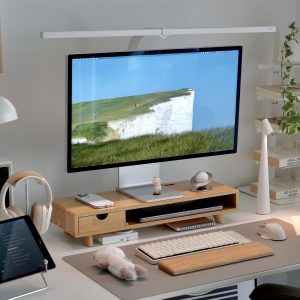
- Adjust your monitor height: The top of your screen should be at or slightly below eye level. A monitor stand like the Slowvana Bamboo Monitor Stand raises your screen to the correct height, reducing neck and eye strain.
- Use the massager before stressful meetings: A 5-minute session can calm your nervous system and improve focus.
- End your day with a session: Use the massager as part of your wind-down routine to signal to your brain that work is over.
Frequently Asked Questions
Can an eye massager improve my vision?
No. An eye massager cannot correct vision problems like nearsightedness or astigmatism. It relieves muscle tension and dry eye symptoms, but it does not change your prescription. For vision issues, consult an optometrist.
How often should I use an eye massager?
Most manufacturers recommend 1-2 sessions per day, each 10-15 minutes. Overuse can irritate the eye area. Listen to your body — if you feel discomfort, reduce frequency.
Is heat or compression better for eye strain?
For desk workers, heat is generally more effective for dry eyes and muscle relaxation. Compression is better for tension headaches. The best eye massager for desk work offers both modes.
Can I use an eye massager with contact lenses?
No. Remove contact lenses before using an eye massager. The heat and pressure can cause discomfort or damage to lenses. Use the massager with your eyes closed and lenses removed.
What is the best eye massager for desk work in 2025?
The best eye massager for desk work in 2025 combines heat and compression, is wireless with USB-C charging, has washable covers, and operates quietly. Look for models with adjustable pressure and a foldable design for easy desk storage.
Conclusion: Choose Recovery, Not Just Relief
The best eye massager for desk work is the one you’ll actually use consistently. Prioritize heat and compression, portability, and hygiene. But remember: no device replaces proper ergonomics. Pair your massager with a Slowvana Bamboo Monitor Stand to raise your screen to eye level, and follow the 20-20-20 rule. Your eyes — and your productivity — will thank you.
Last updated: March 2025. This guide is for informational purposes and does not constitute medical advice. Consult a healthcare professional for persistent eye issues.
🪑 Fix Your Desk Setup in 5 Minutes
Download the free Ergonomic Setup Checklist — 15 steps to reduce pain and work comfortably.
Get Free Checklist →