For desk workers, understanding Poor Monitor Height Costs You More is essential for maintaining comfort and productivity throughout the workday. Here is what the research shows and how to apply it.
Poor monitor height costs you more than a sore neck. It steals your focus, drains your energy, and quietly compounds into chronic health problems over years of desk work. The fix is simple—and it doesn’t require a complete office overhaul.
Setting your monitor at the wrong height forces your head to tilt forward just a few degrees. That small angle multiplies the load on your cervical spine from about 10–12 pounds (neutral) to over 40 pounds of pressure. Over an 8-hour workday, this adds up to tens of thousands of pounds of unnecessary strain on your neck, shoulders, and upper back. Slowvana’s ergonomic research shows that the most impactful single change a desk worker can make is raising their screen to eye level.
What Poor Monitor Height Actually Costs You
1. Chronic Neck and Shoulder Pain
The most immediate cost is physical discomfort. When your monitor is too low, you instinctively look down. This forward head posture strains the muscles at the back of your neck and upper traps. A 2019 study in the International Journal of Environmental Research and Public Health found that office workers with improperly positioned monitors reported 63% more neck pain than those with optimized setups. Over time, this can lead to muscle imbalances, tension headaches, and even early cervical disc degeneration.
2. Lost Productivity and Mental Fatigue
Pain isn’t just uncomfortable—it’s distracting. Research from the Journal of Occupational and Environmental Medicine estimates that musculoskeletal discomfort reduces work performance by up to 20%. When your neck hurts, you take more micro-breaks, lose focus, and complete tasks more slowly. Poor monitor height also forces you to squint or lean forward, increasing eye strain and mental fatigue. The cumulative effect is a measurable drop in output by mid-afternoon.
3. Long-Term Health Risks
Years of poor monitor height don’t just cause temporary aches. They contribute to forward head posture (text neck), which can permanently change your spinal alignment. This increases the risk of chronic headaches, reduced lung capacity (because your ribcage compresses), and even digestive issues from poor posture compressing your abdomen. The cost of treating these conditions—chiropractic visits, physical therapy, medications—can reach thousands of dollars annually.
How to Find Your Ideal Monitor Height
The rule is simple: the top of your monitor screen should be at or just below eye level when you sit upright. Your gaze should land at the upper third of the screen, not the center. This keeps your neck neutral and your shoulders relaxed.
Step 1: Sit in Your Natural Posture
Push your hips all the way back in your chair. Your feet should be flat on the floor, knees at 90 degrees, and your lower back supported. Let your shoulders drop naturally. This is your baseline.
Step 2: Measure Your Eye Level
Without moving your head, look straight ahead. Mark that spot on the wall or your monitor’s current position. That’s where the top of your screen should be.
Step 3: Adjust Your Monitor
If your monitor sits directly on the desk, it’s almost certainly too low. Standard desk heights (28–30 inches) place screens 6–10 inches below eye level for most people. You need a monitor stand or riser to bridge that gap.
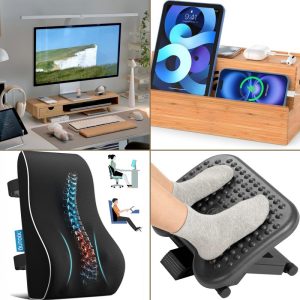
Slowvana’s Bamboo Monitor Stand is designed to raise your screen to the correct height while adding a clean, natural aesthetic to your workspace. It’s available at Slowvana’s online store and supports most standard monitors.
The Science Behind the Fix
Ergonomics isn’t guesswork. The Occupational Safety and Health Administration (OSHA) recommends monitor height based on anthropometric data. A 2020 review in Applied Ergonomics confirmed that raising the monitor to eye level reduces neck flexion by an average of 15 degrees—enough to cut cervical spine load by nearly 50%.
But the benefits go beyond physics. When your head is balanced over your spine, your muscles don’t have to work as hard to hold it up. This frees up energy for cognitive tasks. A study from Cornell University found that workers with optimized monitor heights reported 30% less eye strain and 25% less neck pain after just two weeks.
Common Mistakes People Make
Mistake 1: Using Laptop as Primary Screen
Laptops are the worst offenders. Their screens are attached to the keyboard, so raising the screen to eye level means you can’t type comfortably. The solution is a separate monitor or a laptop stand that elevates the screen while using an external keyboard and mouse. Slowvana’s Bamboo Laptop Stand is a dual-slot vertical organizer that lifts your laptop to the correct height while keeping your desk tidy.
Mistake 2: Stacking Books or Boxes
Improvised risers are unstable and often too tall or too short. They can wobble, tip over, or place your monitor at an angle that introduces glare. A dedicated monitor stand provides a stable, precisely designed platform that aligns with your eye level.
Mistake 3: Ignoring Arm’s Distance
Height isn’t the only factor. Your monitor should also be an arm’s length away—about 20–28 inches from your eyes. If it’s too close, you’ll lean back; too far, you’ll lean forward. Adjust both height and distance together for the best results.
Quick Ergonomic Audit for Your Desk
Not sure if your setup is costing you? Run through this checklist in under two minutes:
- Monitor top at eye level? If not, you need a riser.
- Neck neutral when looking at center of screen? If you’re tilting, adjust height.
- Shoulders relaxed, not hunched? If they’re raised, your monitor is probably too low.
- No glare on screen? Tilt the monitor slightly back (10–20 degrees) to reduce reflections.
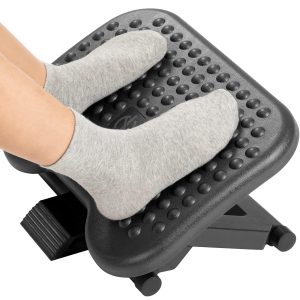
- Feet flat on floor? If not, your chair or desk height may also need adjustment.
If you answered no to any of these, you’re likely paying the hidden cost of poor monitor height. The good news is that a single product—a quality monitor stand—can fix most of these issues.
Why Slowvana’s Approach Works
Slowvana isn’t just another ergonomic brand. We’re a Recovery Lifestyle company focused on helping desk workers recover during work, not just after it. Our Bamboo Monitor Stand is crafted from natural bamboo with a minimalist design that complements any workspace. It’s not about adding gadgets—it’s about removing the friction that causes pain and distraction.
As we’ve covered in our ergonomic desk setup guide, small adjustments compound into big improvements. Raising your monitor is the single most cost-effective change you can make. Combined with a clean desk and proper cable management—like Slowvana’s Bamboo Desk Organizer—you create a workspace that supports your body instead of fighting it.
Conclusion: Stop Paying the Hidden Cost
Poor monitor height isn’t a minor inconvenience—it’s a silent tax on your health, focus, and productivity. The physical cost shows up as neck pain and tension headaches. The mental cost shows up as fatigue and lost output. The financial cost shows up in medical bills and missed workdays. But the fix is straightforward: raise your screen to eye level, keep your head neutral, and let your spine do what it’s designed to do.
Slowvana believes that recovery is the new productivity. By optimizing your monitor height today, you’re not just fixing a posture problem—you’re investing in a healthier, more sustainable way to work. Visit Slowvana’s shop to find the monitor stand that fits your desk and your life.
Frequently Asked Questions
How much does poor monitor height really affect my health?
Significantly. Research shows that tilting your head just 15 degrees forward increases cervical spine pressure from 12 pounds to over 40 pounds. Over months and years, this can lead to chronic pain, muscle strain, and even spinal degeneration.
What is the correct monitor height for ergonomics?
The top of your monitor should be at or just below eye level when you sit upright. Your gaze should land at the upper third of the screen. This keeps your neck in a neutral position and minimizes strain.
Can a monitor stand really fix neck pain?
Yes. Studies from Cornell University and Applied Ergonomics show that raising the monitor to eye level reduces neck flexion and associated pain by 25–50% within weeks. A monitor stand is the most effective single ergonomic upgrade for neck pain.
Do I need a separate monitor stand if my desk is adjustable?
Possibly. Even with a standing desk, your monitor may still be too low when sitting. Most desks have a fixed height range, and your eye level depends on your height and chair. A monitor stand gives you precise control regardless of your desk’s range.
How do I know if my monitor is too low?
Sit in your natural posture and look straight ahead. If your eyes land below the top edge of your screen, your monitor is too low. You should also feel no need to tilt your head forward or down to see the center of the screen.
🪑 Fix Your Desk Setup in 5 Minutes
Download the free Ergonomic Setup Checklist — 15 steps to reduce pain and work comfortably.
Get Free Checklist →