For desk workers, understanding Screen Height and Neck Strain is essential for maintaining comfort and productivity throughout the workday. Here is what the research shows and how to apply it.
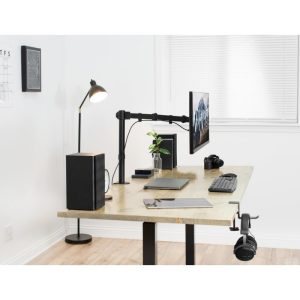
Poor screen height is the single fastest way to wreck your neck by noon. When your monitor sits even two inches too low, your head tilts forward, your upper traps tense up, and your cervical spine loses its natural curve. The fix is simple: raise your screen so your eye level hits the top third of the display. Slowvana’s bamboo monitor stand does exactly that, but let’s unpack why this matters so much more than most desk workers realize.
Why Screen Height Matters More Than You Think
Every inch your head moves forward adds roughly 10 pounds of load on your cervical spine. At neutral, your head weighs about 10–12 pounds. Tilt it forward by just 15 degrees — the angle you adopt when looking down at a low monitor — and that load jumps to 27 pounds. At 30 degrees, it’s 40 pounds. By 45 degrees, you’re asking your neck to support nearly 60 pounds of force all day. This isn’t speculation; it’s biomechanics published in Surgical Technology International.
That constant forward-head posture compresses the discs between your cervical vertebrae, reduces blood flow to the muscles that hold your head up, and triggers a cascade of tension headaches, shoulder pain, and even jaw clenching. Over months and years, it can accelerate disc degeneration and lead to chronic conditions like cervical radiculopathy.
And it’s not just your neck. When your screen is too low, your eyes have to angle downward, which forces your upper eyelids to open wider. This increases tear evaporation and leads to dry eye, blurred vision, and a condition called computer vision syndrome. Your brain also has to work harder to fuse the images from both eyes at a non-optimal angle, which contributes to mental fatigue by early afternoon.
The Real Cost: Lost Productivity and Chronic Pain
If you’re thinking, “My neck hurts but I can push through,” consider this: a study from the Journal of Occupational and Environmental Medicine found that workers with neck pain lose an average of 5.3 hours of productive work per week. That’s over 250 hours a year — more than six full work weeks — spent in discomfort, distraction, and recovery time.
Poor screen position doesn’t just cause pain; it forces your body into a state of low-grade stress. Your sympathetic nervous system stays activated because your muscles are constantly working to hold your head up against gravity. This elevates cortisol, disrupts focus, and makes it harder to enter the deep, calm state needed for creative problem-solving.
Slowvana’s approach to ergonomics isn’t about buying gear for the sake of it. It’s about removing the physical obstacles that keep you from doing your best work. When your screen is at the right height, your body can relax into a neutral posture, your breathing deepens, and your cognitive load drops. You get more done with less effort.
How to Find Your Ideal Monitor Height
The gold standard is simple: when you sit upright with your shoulders relaxed and your head balanced over your spine, your eye level should land at the top third of your monitor screen — roughly one inch below the top bezel. You should not have to tilt your head up or down to read the center of the screen.
Here’s a quick self-check you can do right now:
- Sit in your normal working posture. Close your eyes, then open them. Where does your gaze naturally land? If it’s below the top third of your screen, your monitor is too low.
- Place your hand on your upper chest. If you feel tension in your neck when you look at the center of your screen, your monitor needs to be raised.
- Check your chin position. If it’s jutting forward — even slightly — your screen height is off.
Most desk workers need to raise their monitor by 3 to 6 inches to reach the correct height. This is where a monitor stand becomes essential, not optional. A simple, stable platform like the Slowvana bamboo monitor stand lifts your screen to eye level while also creating valuable storage space underneath for your keyboard or notebook.
What About Laptop Users?
Laptops are the worst offenders when it comes to screen height. Because the keyboard and screen are attached, you can’t optimize both at the same time. If you place your laptop on the desk, your screen is too low. If you raise it to eye level, your keyboard is too high for comfortable typing.
The solution is a two-tier setup: raise your laptop to eye level using a laptop stand, and use a separate external keyboard and mouse on the desk. This gives you the correct screen height while keeping your wrists in a neutral position. Slowvana’s bamboo laptop stand is designed for exactly this — it lifts your screen to a comfortable viewing angle and keeps your workspace organized with its dual-slot vertical design.
If you don’t have an external keyboard yet, start by raising the laptop as high as you can while still being able to type. Even a few inches of elevation makes a measurable difference in neck load. But for a long-term fix, invest in a separate keyboard and mouse. Your neck and shoulders will thank you.
Eye Distance Matters Too
Screen height isn’t the only variable. Distance from your eyes to the screen also affects neck strain and eye fatigue. The ideal distance is roughly an arm’s length — about 20 to 28 inches from your eyes to the screen. If you’re closer than 18 inches, your eye muscles have to work harder to focus, and you’re more likely to lean forward, which worsens your neck angle.
A good rule of thumb: sit back in your chair, extend your arm, and your fingertips should just barely touch the screen. If you have to lean forward to reach it, your monitor is too far. If your arm is bent significantly, it’s too close.
Combine the correct height with the correct distance, and you’ve eliminated two of the biggest contributors to desk-related neck pain. Slowvana’s monitor stand helps here too — by raising the screen, it naturally encourages you to sit back in your chair rather than hunching forward to see the display.
Quick Wins You Can Apply Today
You don’t need to overhaul your entire desk to see improvement. Here are three things you can do right now:
- Raise your monitor — Stack books, a box, or use a dedicated monitor stand. Aim for eye level at the top third of the screen. Even a 2-inch lift reduces neck load by a measurable amount.
- Adjust your chair height — If your monitor is already on a stand but still feels low, try lowering your chair slightly. This changes your eye angle relative to the screen. Just make sure your feet stay flat on the floor or on a footrest.
- Take micro-breaks — Every 20 minutes, look away from your screen at something 20 feet away for 20 seconds. This relaxes your ciliary muscles and resets your neck position. Combine it with a gentle chin tuck to restore neutral alignment.
For a more permanent solution, the Slowvana product line offers clean, natural-material ergonomic tools that blend into your workspace without screaming “office equipment.” The bamboo monitor stand, in particular, is a simple upgrade that pays for itself in reduced discomfort within the first week.
The Recovery Perspective
Slowvana’s philosophy is that recovery isn’t something you do after work — it’s something you build into your workday. Correcting your screen height is a form of passive recovery: you’re removing the stressor so your body can function as it was designed to. When you stop fighting gravity all day, your muscles have more energy for actual work, and your nervous system stays calm.
This is the same principle behind every product Slowvana makes. The monitor stand doesn’t just lift your screen — it lifts the burden off your neck. The laptop stand doesn’t just organize your desk — it organizes your posture. Every small ergonomic fix compounds over time, turning a day of desk work from a source of strain into a sustainable practice.
If you’re serious about protecting your neck and improving your focus, start with your screen height. It’s the highest-leverage change you can make to your workspace. And if you need a simple, beautiful tool to make it happen, Slowvana’s bamboo monitor stand is ready to help.
Frequently Asked Questions
🪑 Fix Your Desk Setup in 5 Minutes
Download the free Ergonomic Setup Checklist — 15 steps to reduce pain and work comfortably.
Get Free Checklist →