The link between Lumbar Support at Work and Hidden Costs directly affects desk worker health. Understanding this relationship helps you address the root cause rather than just treating symptoms.
What Is the Hidden Cost of Poor Lumbar Support at Work?
Poor lumbar support at work costs you more than just a sore back at the end of the day. It quietly drains your energy, reduces your focus, and compounds into chronic health issues that can last for years. The good news? Fixing it is straightforward — and it starts with understanding what’s really happening to your body when your chair doesn’t support your lower back.
Slowvana’s recovery lifestyle philosophy is built on the idea that small, intentional changes to your workspace can prevent big problems later. And lumbar support is one of the most impactful changes you can make.
Why Your Lower Back Bears the Brunt of Sitting
When you sit in a chair without proper lumbar support, your pelvis tilts backward. This flattens the natural curve of your lower spine (the lumbar lordosis) and places excessive pressure on your intervertebral discs. Over an eight-hour workday, that pressure accumulates.
A 2018 study published in Applied Ergonomics found that sitting without lumbar support increased disc pressure by up to 40% compared to sitting with a properly contoured backrest. That’s like adding an extra 30 pounds of force to your lower spine — every single day.
But the hidden cost isn’t just physical. When your spine is misaligned, your body has to work harder to maintain stability. This constant muscular effort drains energy that should be going toward your work. The result? You feel more tired by 3 PM, even if you haven’t done anything physically demanding.
The Four Hidden Costs of Poor Lumbar Support
1. Chronic Lower Back Pain
This is the most obvious cost, but it’s worth unpacking. Lower back pain is the leading cause of disability worldwide, according to the Global Burden of Disease Study. Desk workers are disproportionately affected because prolonged sitting — especially without proper support — accelerates disc degeneration.
A 2020 review in BMC Public Health found that office workers who reported inadequate chair support were 2.5 times more likely to develop chronic low back pain over a three-year period. That’s not a small increase. It’s a fundamental shift in your long-term health trajectory.
If you’ve been ignoring that dull ache at the base of your spine, it’s your body telling you that your current setup isn’t working. The fix isn’t just a new chair — it’s understanding how to create consistent support throughout your workday.
2. Reduced Cognitive Performance
Pain is distracting. But more than that, chronic discomfort triggers your body’s stress response. When your lower back is constantly signaling distress, your brain diverts resources away from higher-order thinking — focus, creativity, problem-solving — and toward managing that pain signal.
A study from the University of Melbourne found that workers with musculoskeletal discomfort experienced a 10-15% drop in cognitive task performance. That’s not just a bad day; that’s a measurable loss in productivity that compounds over weeks and months.
When you fix lumbar support at work, you’re not just protecting your spine. You’re protecting your ability to think clearly and perform at your best.
3. Poor Sleep Quality
This might surprise you, but the back pain you develop during the day doesn’t disappear when you lie down at night. A 2019 study in Sleep Medicine Reviews found that individuals with chronic low back pain were 60% more likely to report poor sleep quality. The pain creates a feedback loop: you sleep poorly, which increases pain sensitivity, which makes the next workday even harder.
Slowvana’s recovery framework — Sleep, Ergo, Stress, Daily — recognizes that ergonomic health and sleep are deeply connected. Fixing your daytime setup can have a direct, positive impact on how well you rest at night.
4. Increased Healthcare Costs
The financial cost of poor lumbar support adds up. Chiropractor visits, physical therapy sessions, pain medications, and even missed work days all have a price tag. A 2021 report from the American Chiropractic Association estimated that back pain costs the U.S. healthcare system over $100 billion annually, with a significant portion attributed to workplace ergonomics.
For an individual, that might mean hundreds or even thousands of dollars per year in treatment costs. A one-time investment in proper lumbar support — whether through a better chair, a lumbar cushion, or a standing desk setup — is far more economical than ongoing medical care.
How to Fix Your Lumbar Support Setup
Fixing lumbar support at work doesn’t require buying an expensive ergonomic chair. Here are three actionable steps you can take today:
Step 1: Assess Your Current Chair
Sit in your chair and place your hand behind your lower back. Can you slide your hand easily between your lower spine and the backrest? If there’s a large gap, you’re not getting support where you need it most. The ideal fit is a backrest that maintains the natural inward curve of your lumbar spine without pushing you forward.
If your chair has a lumbar adjustment mechanism, experiment with the height and depth. The support should sit at the beltline — roughly at the level of your hip bones.
Step 2: Add a Lumbar Cushion or Support
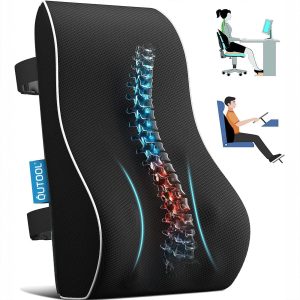
If your chair doesn’t have adjustable lumbar support, a dedicated lumbar cushion can make a huge difference. Look for one that’s firm enough to maintain its shape but soft enough to be comfortable over long periods. Memory foam or gel cushions are excellent choices because they conform to your body while providing consistent support.
Slowvana’s product line focuses on creating a cohesive ergonomic workspace. While we don’t currently offer a standalone lumbar cushion, our bamboo monitor stand and gel wrist rest are designed to work together with proper chair support to create a fully aligned posture setup. Check out our guide to complete desk ergonomics for a full walkthrough.
Step 3: Alternate Between Sitting and Standing
Even the best lumbar support can’t eliminate the negative effects of sitting for eight hours straight. The human body is designed for movement. A sit-stand desk allows you to shift between positions throughout the day, giving your spine a break from sustained pressure.
Research from the CDC suggests that alternating between sitting and standing every 30-60 minutes can reduce back pain by up to 54%. Pair this with proper lumbar support when you’re seated, and you’ve got a powerful combination for long-term spinal health.
The Connection Between Lumbar Support and Overall Posture
Your lumbar spine is the foundation of your entire postural chain. When it’s properly supported, your shoulders naturally relax, your neck aligns with your spine, and your head sits directly above your shoulders. When it’s not, everything above compensates — leading to forward head posture, rounded shoulders, and tension headaches.
A study from the Journal of Physical Therapy Science demonstrated that participants who used a lumbar support device showed significant improvements in cervical (neck) posture as well. Fixing the lower back had a ripple effect all the way up the spine.
This is why Slowvana emphasizes a holistic approach to ergonomics. A monitor stand raises your screen to eye level, but if your lower back isn’t supported, your body will still find ways to compensate. The best results come when every element of your workspace — chair, desk, monitor, keyboard, and wrist support — works in harmony.
Real Data: What Happens When You Fix Lumbar Support
The numbers don’t lie. A 2022 randomized controlled trial published in Work magazine followed office workers who added lumbar support to their existing chairs. After eight weeks:
- 71% reported a significant reduction in lower back pain intensity
- 63% reported improved work concentration
- 55% reported fewer sick days due to back-related issues
These aren’t marginal improvements. They represent a real, measurable shift in quality of life and productivity. And the intervention was simple — a properly designed lumbar support that cost less than a dinner out.
When to Consider a New Chair
Sometimes, adding a lumbar cushion isn’t enough. If your chair has a broken backrest, a seat that’s too shallow or too deep, or armrests that don’t adjust, it might be time for an upgrade. Look for chairs with:
- Adjustable lumbar support (height and depth)
- Seat depth adjustment (so your knees are at 90 degrees with a fist-width gap behind your calves)
- Adjustable armrests (to keep your shoulders relaxed)
- Breathable mesh back (to reduce heat buildup)
That said, a good chair is an investment. If you’re not ready to replace yours, a high-quality lumbar cushion can bridge the gap and provide significant relief in the meantime. For more tips on optimizing your entire workspace, read our article on desk setup for better sleep — because ergonomics and recovery go hand in hand.
Your Next Step Toward a Pain-Free Workday
The hidden cost of poor lumbar support at work is real, but it’s also reversible. You don’t need to accept back pain, fatigue, or lost productivity as inevitable parts of desk work. By understanding what your body needs and making small, intentional changes — starting with your lumbar support — you can protect your health and perform at your best.
Slowvana is here to help you build a workspace that supports recovery, not just work. Whether you’re adjusting your chair, adding a monitor stand, or rethinking your entire desk layout, every step matters. Start with your lower back. The rest of your body will thank you.
🪑 Fix Your Desk Setup in 5 Minutes
Download the free Ergonomic Setup Checklist — 15 steps to reduce pain and work comfortably.
Get Free Checklist →