For desk workers, understanding Anti-Fatigue Mat & Posture is essential for maintaining comfort and productivity throughout the workday. Here is what the research shows and how to apply it.
An anti-fatigue mat can be a double-edged sword. While it reduces leg and foot discomfort, many standard mats create a subtle but significant postural shift: they tilt your pelvis forward, strain your lower back, and misalign your hips. The fix isn’t to ditch the mat entirely—it’s to choose one with proper support, pair it with ergonomic accessories, and adjust your standing technique. Slowvana’s recovery-first approach offers a better path.
How Anti-Fatigue Mats Affect Your Posture
Anti-fatigue mats are designed to encourage micro-movements in your legs and feet, which improves blood circulation and reduces static load. However, the typical thick foam or gel mat has an unintended side effect: it creates an unstable surface that forces your body to compensate. Your hip flexors tighten, your pelvis tilts anteriorly, and your lumbar spine arches excessively. Over time, this can lead to chronic lower back pain and poor standing posture.
A 2019 study in the International Journal of Industrial Ergonomics found that prolonged standing on soft surfaces increased lumbar lordosis by an average of 8 degrees compared to standing on a firm surface. That extra arch compresses the facet joints in your lower spine and strains the surrounding muscles. The very tool meant to help you stand longer may be accelerating postural decline.
Common Postural Problems with Standing Mats
1. Anterior Pelvic Tilt
When your feet sink into a soft mat, your body automatically shifts weight forward to maintain balance. This tilts your pelvis forward—a position known as anterior pelvic tilt. It’s one of the most common standing posture issues among desk workers. Over time, this shortens the hip flexors and weakens the glutes, creating a cycle of imbalance that’s hard to break.
2. Uneven Weight Distribution
Most anti-fatigue mats are uniform in thickness and density. But your body isn’t symmetrical. You naturally favor one leg, especially when tired. A flat mat doesn’t correct this asymmetry; it amplifies it. Standing on a mat that doesn’t accommodate your natural stance can cause one hip to sit higher than the other, leading to scoliosis-like compensations in the spine.
3. Reduced Proprioceptive Feedback
A good standing surface gives your brain constant feedback about your position in space. Thick foam mats dampen this feedback. Your brain no longer knows exactly where your feet are relative to your hips and shoulders. This reduces your ability to self-correct posture and makes it harder to maintain neutral alignment throughout the day.
What to Look for in an Ergonomic Standing Mat
Not all anti-fatigue mats are created equal. To protect your posture, look for these features:
- Firm density: A mat that’s too soft provides no stability. Look for medium-firm foam or gel that supports your weight without excessive sinking.
- Textured surface: A non-slip texture helps your feet maintain position and gives your brain more proprioceptive input.
- Beveled edges: Sharp edges can trip you and create pressure points. Beveled edges allow you to stand closer to your desk without discomfort.
- Size and shape: A mat that’s too small forces you to stand in a fixed position. Choose one that allows natural weight shifts.
- Arch support zones: Some advanced mats have raised areas for arch support, which can improve foot alignment and reduce knee strain.
If your current mat lacks these features, consider replacing it or using it as a secondary surface (e.g., for short breaks) rather than your primary standing platform.
How to Fix Your Standing Posture Today
You don’t need to overhaul your entire setup overnight. Start with these three steps:
Step 1: Check Your Hip Alignment
Stand on your mat and place your hands on your hip bones (ASIS). Gently tilt your pelvis forward and backward until you find neutral—where your hip bones are directly above your pubic bone. This is your starting point. Hold this position for 30 seconds, then relax. Repeat every hour.
Step 2: Adjust Your Desk Height
Your standing desk should be at elbow height when your arms are at 90 degrees. If your desk is too high, you’ll shrug your shoulders. If too low, you’ll lean forward. Use a monitor stand to bring your screen to eye level. Slowvana’s Bamboo Monitor Stand raises your monitor by 5 inches, which helps you maintain a neutral neck and spine while standing.
Step 3: Incorporate Micro-Movements
Standing still is the enemy. Shift your weight from foot to foot every 5–10 minutes. Use a footrest or a small box to elevate one foot at a time—this reduces lumbar load by up to 30%. If your mat allows, try standing on one leg for 30 seconds to engage your core and improve balance.
Ergonomic Accessories That Complement Your Mat
Your anti-fatigue mat is just one piece of the puzzle. To fully protect your posture while standing, consider these additions:
- Monitor stand: Prevents forward head posture by bringing the screen to eye level. Slowvana’s Bamboo Monitor Stand is made from sustainable bamboo and supports up to 22 lbs.
- Wrist rest: Reduces wrist extension when typing. Slowvana’s Gel Wrist Rest uses memory foam and gel to cushion your wrists without compressing over time.
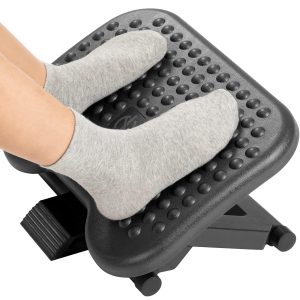
- Footrest: Allows you to alternate foot positions, reducing pelvic tilt. A simple slanted footrest can make a big difference.
- Lumbar support: If you sit between standing sessions, a lumbar cushion maintains your lower back curve.
Slowvana’s product line is designed with recovery in mind. Each item addresses a specific postural risk point, from the neck down to the feet. By combining a proper mat with these accessories, you create a standing environment that supports your body rather than fighting it.
The Science Behind Standing and Recovery
Standing desks are popular for a reason: they reduce sedentary time, improve calorie expenditure, and may lower cardiovascular risk. But standing itself isn’t a cure-all. A 2021 meta-analysis in Preventive Medicine found that standing for more than 2 hours without breaks increased lower back pain risk by 22%. The key is movement—not stillness.
Recovery, as Slowvana defines it, is about building resilience into your workday. It’s not about avoiding fatigue entirely; it’s about managing it intelligently. A good anti-fatigue mat helps you stand longer, but only if it’s paired with proper alignment and regular micro-movements. Think of your standing setup as a dynamic system, not a static position.
When to Replace Your Anti-Fatigue Mat
Mats wear out. Over time, foam compresses, gel hardens, and surface textures smooth out. A mat that’s past its prime offers less support and more instability. Signs it’s time to replace:
- You feel more foot fatigue than when the mat was new
- You notice visible indentations where you stand
- The mat slides on the floor
- You’ve had it for more than 2 years of daily use
When shopping for a replacement, prioritize quality over price. A $30 mat may save money upfront but cost you in postural health later. Invest in a mat that’s firm, textured, and sized for your workspace.
Conclusion: Stand Smarter, Not Harder
Your anti-fatigue mat isn’t inherently bad—it’s just incomplete. Without proper alignment, supportive accessories, and movement habits, even the best mat can contribute to postural problems. The solution is a holistic approach: a firm, well-designed mat paired with ergonomic tools like a monitor stand, wrist rest, and footrest.
Slowvana’s recovery lifestyle philosophy applies here: work with your body, not against it. Start by checking your hip alignment, adjusting your desk height, and incorporating micro-movements. Then, consider upgrading your setup with products that support neutral posture. Your back—and your productivity—will thank you.
Frequently Asked Questions
🪑 Fix Your Desk Setup in 5 Minutes
Download the free Ergonomic Setup Checklist — 15 steps to reduce pain and work comfortably.
Get Free Checklist →