For desk workers, understanding The Ultimate Daily Stretch Sequence… is essential for maintaining comfort and productivity throughout the workday. Here is what the research shows and how to apply it.
The Ultimate Daily Stretch Sequence That Improves Everything
If you sit at a desk for eight or more hours a day, your body adapts — but not in a good way. A daily stretch sequence counteracts these changes by resetting muscle length, improving blood flow, and reducing tension before it becomes chronic pain. The best part? You don’t need a gym or a mat — just a few minutes at your workstation. This 5-minute routine targets the five most common tight spots for desk workers, backed by research from the International Journal of Environmental Research and Public Health and the Journal of Physical Therapy Science.
Why Desk Workers Need a Daily Stretch Sequence
Prolonged sitting places your body in a fixed, flexed position. Over hours, your hip flexors shorten, your chest tightens, your neck juts forward, and your lower back protests. This postural adaptation not only increases pain but also reduces circulation, cognitive focus, and energy levels. A daily stretch sequence specifically designed for seated workers reverses these patterns.
Research supports this. A 2020 study in the International Journal of Environmental Research and Public Health found that a 10-minute workplace stretching program significantly reduced musculoskeletal pain and improved range of motion in office workers. Similarly, a 2019 trial in the Journal of Physical Therapy Science showed that daily stretching of the hip flexors and hamstrings reduced low back pain intensity by over 30% in participants.
The 5-Minute Daily Stretch Sequence
Perform this routine once in the morning and once after lunch for best results. Breathe deeply throughout — never bounce or force a stretch.
1. Neck Release (for Forward Head Posture)
How to do it: Sit up tall with your shoulders relaxed. Gently tilt your head to the right, bringing your ear toward your shoulder. Hold for 20 seconds, then switch sides. Repeat twice.
Why it matters: Releases the upper trapezius and scalenes, which become chronically tight when you look down at a screen.
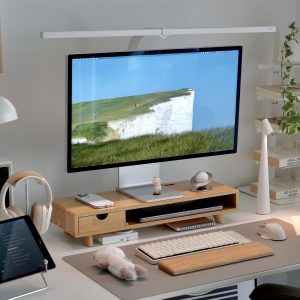
Slowvana tip: Using our Bamboo Monitor Stand to raise your screen to eye level reduces the need for this stretch — but the release still feels fantastic.
2. Shoulder & Chest Opener (for Rounded Shoulders)
How to do it: Stand up and clasp your hands behind your back. Straighten your arms and gently lift them away from your body while pushing your chest forward. Hold for 30 seconds.
Why it matters: Opens the pectorals and anterior deltoids, reversing the hunched posture caused by typing.
3. Seated Spinal Twist (for Lower Back)
How to do it: While sitting, place your left hand on your right knee and your right hand on the back of your chair. Gently twist your torso to the right. Hold for 20 seconds, then switch sides.
Why it matters: Mobilizes the thoracic spine and relieves lower back stiffness from prolonged sitting.
4. Hip Flexor Stretch (for Tight Hips)
How to do it: Step into a lunge position with your right foot forward. Keep your left knee on the ground (use a cushion if needed). Gently push your hips forward until you feel a stretch in the front of your left hip. Hold for 20 seconds, then switch sides.
Why it matters: Counteracts the constant 90-degree angle your hips are stuck in at your desk.
5. Wrist & Finger Stretch (for Typing Strain)
How to do it: Extend your right arm in front of you, palm up. Use your left hand to gently pull your fingers back toward your body. Hold 15 seconds, then switch hands. Then make a fist and slowly release, spreading fingers wide. Repeat three times.
Why it matters: Helps prevent carpal tunnel and repetitive strain from typing.
Frequently Asked Questions
How long should a daily stretch sequence be for desk workers?
Even 5 minutes twice a day (morning and after lunch) can significantly reduce musculoskeletal pain and improve range of motion, according to workplace stretching studies. Consistency matters more than duration.
Can I do these stretches at my desk without equipment?
Yes. All five exercises in this sequence require no equipment and can be performed at your desk or in a small office space. The neck release, seated spinal twist, and wrist stretch can be done sitting; the shoulder opener and hip flexor stretch require standing briefly.
How does the Slowvana monitor stand help with posture?
The Bamboo Monitor Stand raises your screen to eye level, reducing the need to look down. This directly counteracts forward head posture and reduces the strain on your neck and upper back, complementing any daily stretch routine.
Conclusion: Build Recovery Into Your Day
At Slowvana, we believe recovery is the new productivity. A short, intentional stretching habit is one of the most effective recovery practices you can build. It takes less time than scrolling social media, yet it can transform how you feel by the end of the day. Combine this daily stretch sequence with an ergonomic workspace setup — like our Bamboo Monitor Stand and Bamboo Laptop Stand — for a complete recovery lifestyle at your desk.
🪑 Fix Your Desk Setup in 5 Minutes
Download the free Ergonomic Setup Checklist — 15 steps to reduce pain and work comfortably.
Get Free Checklist →