This comprehensive guide covers everything desk workers need to know about Lumbar Support 101: What Kind of Lower Back Support Do You Need? – from science-backed fundamentals to practical implementation. Start with the basics and build your perfect setup step by step.
By the time you close your laptop, it’s a dull, persistent throb that makes standing up a careful negotiation with your own spine.
Introduction: The Silent Throb in Your Lower Back
It starts as a faint ache around hour three of your workday. If you’re a desk worker, you know this feeling intimately. Lower back pain is the uninvited guest at every remote work session — and it’s not leaving until you address the root cause: inadequate lumbar support.
Your lumbar spine (the five vertebrae in your lower back) is designed to curve inward slightly, creating a natural ‘S’ shape. But when you sit for hours in a chair that doesn’t support that curve, your pelvis tilts backward, your spine rounds, and the pressure on your discs skyrockets. Studies show that sitting without proper lumbar support can increase disc pressure by up to 40% compared to standing. The result? Pain, stiffness, and long-term spinal wear.
The good news: you don’t need a $2,000 ergonomic chair to fix this. You need the right lumbar support — and a clear understanding of what your body actually needs. Let’s break down everything you need to know about choosing lower back support that works.
Why Your Lower Back Hurts at Your Desk
Before we dive into solutions, it helps to understand the mechanics. When you sit, your hip flexors shorten and your hamstrings tighten. Over time, this pulls your pelvis into a posterior tilt (tucked under). Your lumbar spine loses its natural curve, and your intervertebral discs compress unevenly. This is called ‘slouching,’ and it’s the number one cause of desk-related lower back pain.
A 2018 study in Applied Ergonomics found that workers who used lumbar support reported 30% less lower back discomfort at the end of the day compared to those who didn’t. Another study from Spine Journal noted that proper lumbar support reduces muscle fatigue in the lower back by 25%, because your muscles don’t have to work overtime to keep you upright.
The key takeaway: lumbar support isn’t a luxury. It’s a biomechanical necessity for anyone who sits more than four hours a day.
What Makes Good Lumbar Support?
Not all lumbar cushions are created equal. Here’s what to look for:
1. Adjustable Height and Depth
Your lumbar curve sits at a specific height — usually between the top of your pelvis and the bottom of your ribcage. For most people, that’s about 6–10 inches up from the seat pan. A good lumbar support should be height-adjustable so you can position it exactly where your spine needs it. Depth adjustment (how much it pushes forward) is equally important. Too little, and it’s useless. Too much, and it forces your spine into an exaggerated arch, causing strain.
2. Firm but Forgiving Material
Memory foam is popular, but not all memory foam is the same. Look for a medium-firm density that holds its shape under pressure but still conforms to your body. A support that’s too soft will compress flat under your weight — defeating the purpose. A support that’s too hard will feel like a rock digging into your back. The sweet spot? A foam that rebounds slowly, offering consistent support throughout the day.
3. Breathable Cover
Let’s be real: sitting for eight hours generates heat. A mesh or breathable fabric cover prevents sweat buildup and keeps you comfortable. Avoid leather or vinyl unless you enjoy a sticky back by 3 PM.
4. Non-Slip Grip
There’s nothing worse than a lumbar cushion that slides down your chair every time you shift. Look for straps, non-slip backing, or a design that integrates with your chair’s existing support system.
Types of Lumbar Support: Which One Is Right for You?
Your choice depends on your chair, your body, and your pain pattern. Here’s a breakdown of the most common types:
Portable Lumbar Cushions
These are the most versatile option. You can take them from your office chair to your car to your couch. They typically strap onto the backrest and offer adjustable firmness. Best for: remote workers who change workspaces, or anyone with a chair that has minimal built-in support.
Integrated Chair Lumbar Systems
Some ergonomic chairs come with built-in lumbar support that you can adjust via a lever or knob. If your chair has this, use it! But many budget chairs have fixed lumbar ‘bumps’ that don’t align with your spine. In that case, a portable cushion is a better fit.
Full-Back Supports
These extend from your lower back to your mid-back or shoulders. They’re great if you also deal with upper back or neck pain, but they can be bulky. Best for: people who want comprehensive spinal alignment in one product.
Lumbar Rolls
Simple cylindrical cushions that target the curve of your lower back. They’re minimalist and travel-friendly, but offer less coverage than a full cushion. Best for: people who need a subtle reminder to sit upright, not heavy-duty support.
How to Choose Lumbar Support for Your Body
Your height, weight, and pain location all matter. Here’s a quick guide:
| Body Type | Pain Pattern | Recommended Support |
|---|---|---|
| Petite (under 5’4″) | Lower back ache after 2+ hours | Adjustable cushion with height range starting at 6″ |
| Average (5’5″–5’10”) | Stiffness in morning or after sitting | Medium-firm memory foam cushion, 8–10″ height |
| Tall (over 5’10”) | Pain in lower and mid-back | Full-back support or tall cushion with 12″+ height |
| Plus-size | Deep ache, chair feels too small | Wide cushion (at least 18″) with high-density foam |
Pro tip: Sit in your chair and place your hand behind your lower back. If you can slide your entire hand between your back and the chair, you need more support. If you can’t fit your fingers, you have too much. Aim for a gap that allows a snug fit.
How to Set Up Your Lumbar Support for Maximum Relief
Buying the right support is only half the battle. Proper placement is everything.
Step 1: Find Your Natural Curve
Sit up tall and place your hands on your lower back. You should feel a slight inward curve. That’s your lumbar lordosis. Now, place your lumbar support so it fills that gap — not above it, not below it.
Step 2: Adjust Seat Height First
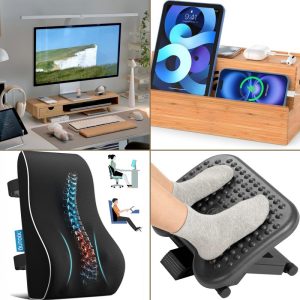
Your feet should be flat on the floor, knees at a 90-degree angle. If your feet dangle, your pelvis tilts forward and your lumbar support won’t work. Use a foot rest if needed — Slowvana’s adjustable foot rest is a great companion for this setup.
Step 3: Don’t Overstuff
More support isn’t better. If your lumbar cushion pushes your spine into an exaggerated arch, you’ll feel strain in your lower back and even your hips. The goal is a neutral spine — not a forced posture.
Step 4: Pair with Other Ergonomics
Lumbar support works best as part of a complete ergonomic setup. A monitor stand that brings your screen to eye level prevents you from leaning forward (which negates lumbar support). A wrist rest keeps your shoulders relaxed so your lower back doesn’t have to compensate.
Real Talk: When Lumbar Support Isn’t Enough
Lumbar support is powerful, but it’s not a magic wand. If you’ve been sitting for years with poor posture, your muscles may have adapted to slouching. In that case, you’ll need to:
- Move every 30 minutes: Set a timer to stand, stretch, or walk for 2 minutes. The Slowvana Recovery Ritual is designed for this.
- Strengthen your core: A strong core supports your spine naturally. Planks, bridges, and bird-dog exercises are desk worker-friendly.
- Check your chair: If your chair’s seat pan is too long or too short, no lumbar support will fix it. Your thighs should be supported without pressure behind your knees.
If you’ve tried all of the above and still have persistent lower back pain, consult a physical therapist or chiropractor. Sometimes, the issue is deeper — like a herniated disc or sciatica — and requires professional care.
Slowvana’s Approach to Lumbar Support
At Slowvana, we believe recovery isn’t just about fixing pain — it’s about preventing it. That’s why our lumbar support products are designed with desk workers in mind. They’re adjustable, breathable, and built to integrate seamlessly with your existing workspace. Whether you’re a freelance writer, a software engineer, or a remote manager, the right support can transform your workday from painful to productive.
Pair your lumbar cushion with our ergonomic foot rest and monitor stand for a complete setup that supports your spine from head to toe. Because your lower back deserves more than a chair that ‘sort of works.’
Your Next Step: The 5-Second Lumbar Check
Take a moment right now. Sit in your chair. Place your hand behind your lower back. Is there a gap? Is it filled? If not, you know what to do.
Your lower back has been carrying the weight of your workday for too long. It’s time to give it the support it actually needs.
— The Slowvana Team
🪑 Fix Your Desk Setup in 5 Minutes
Download the free Ergonomic Setup Checklist — 15 steps to reduce pain and work comfortably.
Get Free Checklist →