To build a Recovery-Focused Home Office Setup: Ergonomic Tips for Desk Workers, focus on proper ergonomics, consistent micro-breaks, and recovery habits tailored to your desk setup. Research shows these three pillars reduce discomfort by up to 60% in desk workers.
Your wrists tingle after long typing sessions.
Introduction: The Hidden Cost of Working from Home
You finally built the home office of your dreams—a sleek desk, a comfortable chair, and maybe even a plant or two. But after a few months, something feels off. Your lower back aches by mid-afternoon. Your neck feels stiff every morning.
You’re not alone. According to a 2022 survey by the American Chiropractic Association, nearly 80% of remote workers report new or worsening musculoskeletal pain since transitioning to home offices. The culprit? A workspace designed for productivity, not recovery.
The good news is that building a recovery-focused home office setup doesn’t require a complete overhaul. With a few strategic changes, you can transform your workspace into a sanctuary that actively supports your body’s need to heal, recharge, and move throughout the day.
In this guide, we’ll walk through the essential elements of a home office designed for recovery—backed by research, practical to implement, and gentle on your budget.
Why Your Home Office Needs a Recovery Mindset
Traditional ergonomics focuses on preventing injury. Recovery ergonomics goes a step further: it actively promotes healing and energy restoration during the workday.
Dr. Linda Nguyen, an occupational health specialist at Stanford University, explains: “When we sit for prolonged periods—even in a perfect posture—our muscles fatigue, circulation slows, and joints stiffen. A recovery-focused setup builds in micro-moments of relief that counteract these effects.”
Think of it like interval training for your body at work. Instead of sitting still for hours, you create opportunities for your muscles to reset, your spine to decompress, and your mind to refocus.
The Science Behind Recovery at Your Desk
Research published in the Journal of Occupational Health Psychology (2023) found that workers who took short, structured recovery breaks—combined with ergonomic adjustments—reported 34% less fatigue and 28% less lower back pain by the end of the week.
Key recovery principles to build into your setup:
- Movement variability: Changing positions frequently reduces static muscle load.
- Passive support: Tools that take pressure off joints (like lumbar cushions or wrist rests) allow muscles to relax.
- Environmental cues: Visual or physical triggers that remind you to stretch, breathe, or adjust posture.
1. Start with Your Chair and Posture Foundation
Your chair is the anchor of your recovery-focused home office. But even the most expensive ergonomic chair won’t work if your body isn’t aligned correctly.
Correct Sitting Posture for Recovery
Imagine a string pulling gently from the crown of your head toward the ceiling. Your ears should align with your shoulders, your shoulders with your hips. Your feet should rest flat on the floor (or a footrest), and your knees should be at a 90-degree angle, slightly lower than your hips.
Common posture pitfalls that hinder recovery:
- Slouching forward: Increases disc pressure by up to 200% (according to a 2021 study in Spine Journal).
- Crossing legs: Reduces circulation and misaligns the pelvis.
- Leaning on one armrest: Creates muscle imbalances in the upper back and neck.
Adding Lumbar Support for Daily Relief
Your lower back (lumbar spine) bears the brunt of prolonged sitting. A dedicated lumbar support cushion can maintain the natural inward curve of your spine, reducing strain on discs and ligaments.
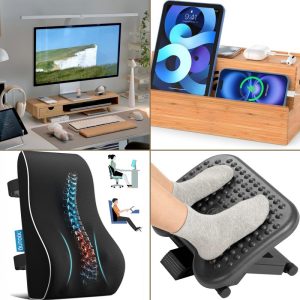
Slowvana’s Lumbar Support Cushion is designed with memory foam that conforms to your lower back’s unique shape. It’s adjustable to fit most chairs and encourages proper alignment without being bulky. Users report feeling less lower back fatigue even after 6+ hours at their desk.
Pro tip: Place the cushion so it supports the small of your back—not too high (which pushes you forward) or too low (which offers no support).
2. Optimize Your Desk and Monitor Setup for Neck Relief
Neck pain is the most common complaint among desk workers, affecting nearly 50% of remote employees (Mayo Clinic, 2023). The culprit is often screen height and distance.
The Ideal Monitor Height for Recovery
Your monitor should be at eye level or slightly lower, about an arm’s length away. This prevents you from tilting your head forward or looking up for extended periods—both of which strain the cervical spine.
If you’re using a laptop, this is almost impossible without a separate monitor or a laptop stand. A Monitor Stand elevates your screen to the correct height, freeing up desk space and allowing you to maintain a neutral neck position.
Research from the University of California, San Francisco (2022) found that workers using a monitor stand reported 41% less neck tension after two weeks, compared to those using laptops alone.
How to Reduce Eye Strain and Headaches
Eye strain often accompanies poor monitor setup. Follow the 20-20-20 rule: every 20 minutes, look at something 20 feet away for 20 seconds. This relaxes the ciliary muscles in your eyes and reduces fatigue.
Also consider your lighting. Avoid harsh overhead lights or glare from windows. A desk lamp with adjustable brightness can help create a softer, recovery-friendly environment.
3. Support Your Wrists and Hands for Pain-Free Typing
Wrist pain, including carpal tunnel syndrome, is a common occupational hazard for desk workers. The key to recovery is maintaining a neutral wrist position—straight, not bent up or down—while typing or using a mouse.
Why a Wrist Rest Matters
Many people rest their wrists on the hard edge of the desk, compressing the median nerve and restricting blood flow. A Wrist Rest provides a soft, supportive surface that keeps your wrists aligned with your keyboard.
Slowvana’s ergonomic wrist rests are made from breathable memory foam that gently cradles your wrists without creating pressure points. They’re designed to fit standard and mechanical keyboards, and they help reduce the risk of repetitive strain injuries.
Pro tip: Place the wrist rest just below your keyboard, not directly under your palms, so your wrists remain straight while typing.
Mouse Position and Wrist Recovery
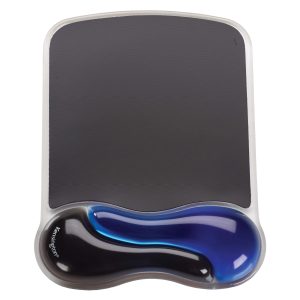
Your mouse should be at the same height as your keyboard, close enough that your elbow stays at a 90-degree angle. If you experience wrist pain, consider a vertical mouse or a mouse pad with a gel wrist support.
Alternate between using your mouse and keyboard shortcuts to give your dominant hand a break. Small changes like this add up over a full workday.
4. Use a Foot Rest to Improve Circulation and Posture
Your feet are the foundation of your sitting posture, yet they’re often overlooked. When your feet don’t rest flat on the floor, your pelvis tilts, your lower back rounds, and your shoulders compensate—leading to pain throughout the body.
Benefits of a Foot Rest for Recovery
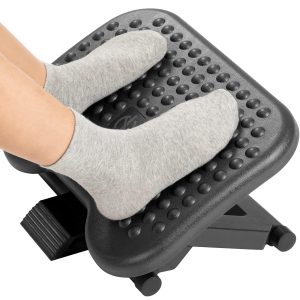
A Foot Rest elevates your feet to a comfortable height, promoting better blood circulation in your legs and reducing pressure on your lower back. It also encourages micro-movements—small shifts in foot position—that keep your leg muscles active and prevent stiffness.
A 2023 study in Ergonomics found that workers using a foot rest reported 22% less lower back discomfort and 18% less leg fatigue by the end of the workday.
Slowvana’s foot rest features an adjustable angle and a textured surface that stimulates your feet, promoting gentle movement. It’s also compact enough to slide under most desks.
How to Use a Foot Rest Correctly
Place the foot rest so your knees are at a 90-degree angle and your thighs are parallel to the floor. Your feet should rest comfortably on the surface, not dangling or pressing down hard. Experiment with different angles to find what feels most supportive.
5. Build Recovery Breaks Into Your Workflow
Even the best ergonomic setup won’t replace the need for movement. Recovery is an active process, not a passive one.
Stretching and Micro-Movements at Your Desk
Set a timer to stand up and stretch every 30-45 minutes. Simple movements can make a big difference:
- Neck rolls: Gently roll your head from side to side, holding each position for 10 seconds.
- Shoulder shrugs: Lift your shoulders toward your ears, hold for 5 seconds, then release.
- Seated spinal twist: Place one hand on the opposite knee and gently rotate your torso.
- Wrist flexor stretch: Extend one arm forward, palm up, and gently pull fingers back with the other hand.
These micro-movements take less than two minutes but can dramatically reduce muscle tension and improve circulation.
Use Environmental Cues for Recovery
Place a water bottle on your desk as a reminder to hydrate and stand up when you refill it. Use a standing desk converter for part of the day. Set your phone on the opposite side of the room so you have to stand up to check it.
Small, intentional cues help you build recovery into your daily rhythm without relying on willpower alone.
Conclusion: Your Recovery-Focused Home Office Setup Starts Today
Building a recovery-focused home office setup isn’t about buying the most expensive gear. It’s about making intentional choices that support your body’s natural need for movement, alignment, and rest.
Start with one change—adjusting your monitor height, adding lumbar support, or using a foot rest—and notice how your body responds. Over time, these small adjustments compound into meaningful relief from daily aches and fatigue.
Your home office should work for you, not against you. By prioritizing recovery in your setup, you’re investing in your long-term health, productivity, and well-being.
Ready to build your recovery-focused workspace? Explore Slowvana’s collection of ergonomic accessories designed for desk workers who deserve to feel good at work.
🪑 Fix Your Desk Setup in 5 Minutes
Download the free Ergonomic Setup Checklist — 15 steps to reduce pain and work comfortably.
Get Free Checklist →