For desk workers, understanding Ergonomic Accessories That Actually Make a Difference for Desk Workers is essential for maintaining comfort and productivity throughout the workday. Here is what the research shows and how to apply it.
You’ve been there: the dull ache in your lower back by 3 PM, the wrist that tingles after a long typing session, the neck stiffness that makes turning your head feel like a betrayal.
You’ve tried rolling your shoulders back every hour, but within minutes, you’re hunched again. So you start searching for solutions, and suddenly you’re drowning in a sea of ergonomic accessories — each promising to fix your posture, banish your pain, and transform your workday.
But here’s the hard truth: not all ergonomic accessories are created equal. Some are backed by solid research and can genuinely improve your comfort and health. Others are expensive paperweights. This guide will help you separate the game-changers from the gimmicks, so you can invest in what actually works.
The Overlooked Foundation: Your Feet and Legs
Most people start their ergonomic journey from the top down — first the monitor, then the chair, maybe the keyboard. But the real foundation of good posture begins at your feet. When your feet don’t rest flat on the floor, your entire kinetic chain compensates. Your hips tilt, your spine curves, and your shoulders round forward to maintain balance.
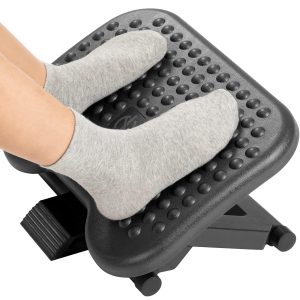
A foot rest is one of the most underrated ergonomic accessories. Studies show that a foot rest can reduce pressure on the lower back by up to 30% and improve circulation in the legs. For desk workers whose feet dangle (common with taller desks or shorter individuals), a foot rest provides the stability your body craves.
What to look for: Choose a foot rest that allows movement. The best models let you rock or tilt your feet, which keeps blood flowing and prevents stiffness. Adjustable height is also key — your knees should form a 90-degree angle, with feet flat and supported.
Slowvana’s foot rests are designed with this dynamic movement in mind, offering gentle rocking that mimics the natural motion of walking while seated. It’s a small change that makes a big difference over an eight-hour day.
Monitor Stands: The Neck Pain Solution You’ve Been Ignoring
Neck pain is the most common complaint among desk workers, and the culprit is almost always your screen position. According to a 2021 study in the International Journal of Environmental Research and Public Health, 76% of office workers report neck pain, and improper monitor height is a primary contributor.
When your monitor is too low, you tilt your head forward to see the screen. This forward head posture increases the load on your cervical spine from about 10-12 pounds (the weight of your head in neutral) to a staggering 60 pounds at just 60 degrees of tilt. That’s like balancing a small child on your neck all day.
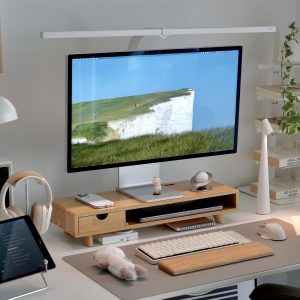
A monitor stand elevates your screen to eye level, keeping your head in a neutral position. The rule is simple: the top of your monitor should be at or just below eye level, about an arm’s length away. This alignment reduces strain on your neck and upper traps, and it also helps prevent eye strain by encouraging you to sit at a proper distance.
What to look for: Adjustability is everything. A fixed stand works if you’re the only user, but a height-adjustable stand or monitor arm is ideal for shared workspaces or if you alternate between sitting and standing. Make sure the stand is sturdy enough to support your monitor’s weight without wobbling.
Slowvana’s monitor stands offer multiple height settings and a sleek design that doesn’t sacrifice stability. They also include hidden storage for your keyboard or desk clutter — a bonus for workspace organization.
Wrist Rests: Evidence or Hype?
Wrist rests are one of the most debated ergonomic accessories. Some experts swear by them; others say they can actually increase pressure on the carpal tunnel. So what’s the truth?
The key is how you use them. A wrist rest should support your palms, not your wrists. When you rest your wrists directly on a hard surface, you compress the carpal tunnel, which can exacerbate conditions like carpal tunnel syndrome. The correct use is to place the rest under the heel of your palm, keeping your wrists straight and floating above the keyboard.
A 2019 review in Applied Ergonomics found that gel wrist rests can reduce contact pressure by 25-40% compared to using a hard desk surface alone. But the same study warned that poorly designed rests (too thick or too hard) can increase pressure on the median nerve.
What to look for: Look for a wrist rest that is firm enough to provide support but soft enough to conform to your palm. Memory foam or gel with a breathable cover is ideal. The thickness should match the height of your keyboard so your wrists stay in a neutral, straight position — not bent up or down.
Slowvana’s wrist rests use a dual-layer memory foam that balances support and comfort. They’re also machine-washable, because desk hygiene matters more than most people realize.
Lumbar Support: More Than Just a Cushion
Lower back pain affects an estimated 80% of adults at some point in their lives, and prolonged sitting is a major risk factor. The lumbar spine has a natural inward curve, and when you slouch in a chair, that curve flattens, putting pressure on the discs and surrounding muscles.
A lumbar support cushion helps maintain that natural curve. But not all lumbar supports are created equal. A 2020 study in Ergonomics compared different types of lumbar supports and found that adjustable supports that target the specific curve of your spine were significantly more effective than generic, one-size-fits-all cushions.
The sweet spot for lumbar support is between the top of your pelvis and the bottom of your ribcage — roughly at the belt line. Too high, and it pushes your shoulders forward; too low, and it does nothing.
What to look for: Adjustable straps that let you position the support exactly where you need it. Breathable mesh or foam that doesn’t trap heat. Some lumbar supports also include a massage function or heat therapy, which can be helpful for chronic tension but isn’t necessary for everyone.
Slowvana’s lumbar support cushions are designed with a contoured shape that adapts to your spine’s natural curve. They attach securely to most office chairs and are slim enough to not push you too far forward.
Putting It All Together: How to Build Your Ergonomic Setup
Buying ergonomic accessories is only half the battle. The other half is setting them up correctly. Here’s a step-by-step checklist to optimize your workspace:
- Start with your chair. Adjust the seat height so your feet rest flat on the floor or on your foot rest. Your knees should be at a 90-degree angle, with thighs parallel to the floor.
- Add lumbar support. Place the cushion at belt level, adjusting until you feel gentle pressure supporting your lower back.
- Position your monitor. Use your monitor stand to bring the screen to eye level. The top of the monitor should be at or just below eye level, about 20-28 inches from your face.
- Align your keyboard and mouse. Your keyboard should be at a height where your elbows are at 90 degrees and your wrists are straight. Place your wrist rest so it supports your palms, not your wrists.
- Check your feet. If your feet don’t rest flat on the floor, use a foot rest to support them. Your knees should remain at 90 degrees.
- Take breaks. No accessory can replace movement. Use the 20-20-20 rule: every 20 minutes, look at something 20 feet away for 20 seconds. Stand and stretch at least once an hour.
What to Skip: Ergonomic Accessories That Don’t Deliver
Not every product on the market is worth your hard-earned money. Here are a few that consistently underperform:
- Posture corrector braces: These wearable devices pull your shoulders back, but they don’t train your muscles to maintain that position on their own. In fact, they can weaken your postural muscles over time by doing the work for them.
- Kneeling chairs: While they can improve posture in the short term, kneeling chairs put significant pressure on the knees and shins, and most people can’t sustain the position for more than 30 minutes.
- Balance ball chairs: These require constant micro-movements to stay upright, which can be exhausting and may not provide enough stability for tasks that require fine motor control, like typing.
- Cheap gel wrist rests: Very soft gel rests can collapse under your weight, causing your wrists to bend at an awkward angle. Look for firm memory foam instead.
The Bottom Line: Invest in What Works
Ergonomics is not about buying every gadget on the market. It’s about understanding your body’s needs and choosing tools that support healthy alignment. The four accessories that make the most difference — monitor stands, wrist rests, foot rests, and lumbar support — are backed by research and can dramatically improve your comfort and productivity.
When you invest in these items, you’re not just buying a product. You’re investing in your long-term health, your ability to work without pain, and your quality of life beyond the office. Start with one change today — maybe a foot rest or a monitor stand — and notice how your body responds. Small shifts lead to big transformations.
Your desk should work for you, not against you. With the right ergonomic accessories, you can create a workspace that supports your body, reduces pain, and helps you do your best work. That’s a difference worth making.
🪑 Fix Your Desk Setup in 5 Minutes
Download the free Ergonomic Setup Checklist — 15 steps to reduce pain and work comfortably.
Get Free Checklist →