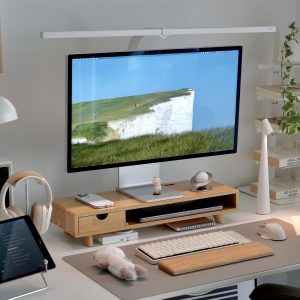
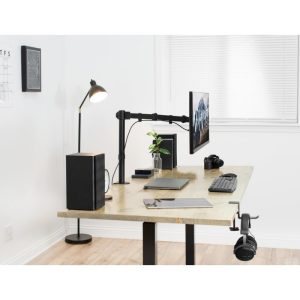
The link between The Perfect Desk Setup for Stress Reduction and How Your Workspace Shapes Your Nervous System directly affects desk worker health. Understanding this relationship helps you address the root cause rather than just treating symptoms.
Your Desk Is More Than a Workspace—It’s a Nervous System Hub
You’ve adjusted your chair height. You’ve aligned your monitor at eye level. You’ve even bought that lumbar cushion everyone raves about. Yet by 3 PM, your shoulders are up by your ears, your jaw is tight, and your mind feels like a browser with 47 tabs open.
If this sounds familiar, you’re not alone. Most ergonomics advice focuses on posture—angles, alignment, and avoiding physical pain. But there’s a deeper layer we rarely discuss: how your desk setup affects your stress levels.
Research from the Journal of Environmental Psychology suggests that our physical environment directly influences cortisol production and autonomic nervous system activity. In other words, the way you arrange your desk can either trigger a stress response or help you stay calm, focused, and resilient.
This isn’t about swapping your office chair for a standing desk and calling it a day. It’s about designing a workspace that supports your nervous system—so you can work with your biology, not against it.
The Stress-Posture Feedback Loop: Why It’s Not “Just in Your Head”
To understand how a desk setup can reduce stress, we first need to look at the relationship between your body and your brain.
When you’re stressed, your body reacts instinctively: shoulders rise, breathing becomes shallow, and your head juts forward. This is the classic “fight or flight” posture. But here’s the problem—this posture also signals your brain that you’re under threat, creating a feedback loop of tension.
A 2017 study from Harvard Business Review found that expansive, open postures increase testosterone and decrease cortisol, while constricted postures do the opposite. Your desk setup can either reinforce that constricted, stress-inducing posture or help you maintain an open, grounded one.
Key elements that break the loop:
- Neutral spine alignment – When your spine is neutral, your diaphragm can move freely, supporting deeper, calmer breathing.
- Open chest and shoulders – This signals safety to your nervous system, reducing amygdala activation.
- Grounded feet – A stable base reduces the “startle reflex” and helps you feel more in control.
Your desk setup isn’t just about comfort—it’s a tool for nervous system regulation.
5 Elements of a Desk Setup for Stress Reduction (Beyond Posture)
1. Visual Calm: The Monitor Position That Lowers Cognitive Load
Most people think monitor height is about neck pain. But where you place your screen also affects your mental state.
When your monitor is too low, you crane your neck forward—a posture associated with vigilance and stress. When it’s too high, you may feel a subtle sense of being “on edge.”
The ideal position for stress reduction: the top third of your screen at or slightly below eye level, about an arm’s length away. This keeps your neck in a neutral position and your peripheral vision open, which reduces the “tunnel vision” effect that can trigger anxiety.
Using a monitor stand isn’t just about ergonomics—it’s about creating a visual horizon line that tells your brain, “You’re safe. You can see what’s coming.”
2. Grounding Your Foundation: The Foot Rest Effect
Your feet are your body’s foundation. When they dangle or rest unevenly, your pelvis tilts, your spine compensates, and your stress response activates.
A 2019 study in Frontiers in Psychology found that grounding (earthing) through foot contact with a stable surface reduced cortisol levels and improved heart rate variability—a key marker of stress resilience.
If your feet don’t rest flat on the floor, a foot rest provides that stable, grounded sensation. It’s not just about knee angle—it’s about giving your nervous system a solid base to work from.
3. Wrist Support and the “Soft Landing” Reflex
Your wrists are a surprising stress sensor. When you type with unsupported wrists, your forearms and shoulders engage more, creating tension that radiates up to your neck and jaw.
A wrist rest isn’t just for carpal tunnel prevention. It creates a “soft landing” for your hands, which signals to your brain that you can relax your grip. This reduces the unconscious clenching that often accompanies stress.
Look for a gel or memory foam wrist rest that keeps your wrists in a neutral position—not bent up or down. Your shoulders will thank you by dropping away from your ears.
4. Lumbar Support: The Seat of Your Emotional Center
Your lower back is intimately connected to your emotional state. In somatic psychology, the lumbar spine is considered a “stress storage” area—when we’re anxious, we often tighten here without realizing it.
Proper lumbar support encourages your pelvis to tilt slightly forward, maintaining the natural curve of your spine. This isn’t just about back pain—it’s about creating a sense of internal support. When your lower back feels held, your nervous system interprets that as safety.
A lumbar cushion or ergonomic chair with adjustable lumbar support can make a dramatic difference in your baseline stress level by the end of the workday.
5. The Peripheral Environment: Lighting, Sound, and Air
Your desk setup extends beyond what you touch. The peripheral environment plays a massive role in stress regulation:
- Lighting: Harsh overhead lights increase cortisol. Use warm, indirect lighting or a desk lamp with adjustable color temperature.
- Sound: Open offices or noisy home environments trigger the startle reflex. Consider noise-cancelling headphones or a white noise machine.
- Air quality: CO2 buildup from poor ventilation can cause brain fog and anxiety. A small air purifier or even an open window helps.
These elements work together with your physical setup to create a “stress buffer zone.”
How to Design Your Desk Setup for Stress Reduction: A Step-by-Step Guide
Ready to implement these principles? Here’s a simple process to transform your workspace today.
Step 1: Reset Your Baseline
Start by clearing your desk entirely. Remove everything except your computer, keyboard, and mouse. This gives you a blank slate to build from.
Step 2: Anchor Your Feet
Sit in your chair and place your feet flat on the floor. If they don’t reach, use a foot rest. Feel the ground beneath you. Take three deep breaths here before adjusting anything else.
Step 3: Align Your Monitor
Use a monitor stand to bring your screen to eye level. Your gaze should fall naturally on the top third of the screen. This opens your chest and allows your diaphragm to move freely.
Step 4: Support Your Wrists
Place a wrist rest in front of your keyboard. When you type, keep your wrists straight and your shoulders relaxed. Notice any tension in your jaw or neck and consciously release it.
Step 5: Support Your Lower Back
Adjust your chair’s lumbar support or add a lumbar cushion. You should feel a gentle pressure against your lower back, not a hard push. This creates a sense of being “held.”
Step 6: Adjust Your Environment
Dim harsh lights, add a small plant or a calming image, and reduce noise. These micro-adjustments signal safety to your brain.
The Science of Micro-Breaks: Why Even the Best Setup Needs Rhythm
No desk setup can eliminate stress entirely—but it can make stress recovery faster.
Research from the University of Illinois found that taking brief “micro-breaks” (30-60 seconds every 20 minutes) to stand, stretch, or shift your gaze reduces cortisol buildup and improves focus. Your setup should support these breaks, not hinder them.
For example, a monitor stand that allows quick height adjustment makes it easy to stand during a micro-break. A foot rest you can slide out of the way keeps your transition smooth. These small moments of movement reset your nervous system.
Common Mistakes That Increase Stress (Even With a “Good” Setup)
Even with the right equipment, certain habits can undermine your stress reduction efforts:
- Gripping your mouse too tightly – This sends tension up your arm. Use a relaxed grip and consider a vertical mouse.
- Sitting for hours without breaks – Prolonged sitting increases cortisol regardless of posture.
- Ignoring your breathing – Shallow breathing reinforces stress. Set a reminder to take three deep breaths every hour.
- Over-relying on standing desks – Standing all day can be just as stressful as sitting. Alternate between sitting and standing with proper support.
Your Desk Setup as a Daily Reset Tool
Think of your workspace as a tool for nervous system regulation—not just a place to get work done. Every element, from your monitor height to your wrist rest, sends a signal to your brain: “You are safe. You can relax. You can focus.”
By designing a desk setup for stress reduction, you’re not just preventing pain—you’re building resilience. You’re creating an environment that works with your biology, helping you stay calm, clear, and productive even on the most demanding days.
Start with one change today. Anchor your feet. Adjust your screen. Support your back. Notice how your body responds. That awareness is the first step toward a workspace that truly supports you.
“The body is the unconscious mind. When you change how you sit, you change how you feel.” — Adapted from somatic psychology principles
Ready to build your stress-reducing desk setup? Explore Slowvana’s ergonomic accessories—monitor stands, wrist rests, foot rests, and lumbar support—designed to support your body and calm your nervous system.
🪑 Fix Your Desk Setup in 5 Minutes
Download the free Ergonomic Setup Checklist — 15 steps to reduce pain and work comfortably.
Get Free Checklist →