Your Office Chair Is Ruining Your Sleep (and How to Fix It) because prolonged sitting compresses joints, restricts blood flow, and disrupts natural recovery cycles. The right ergonomic setup and movement breaks directly counteract these effects.
Introduction: When Your Chair Steals Your Sleep You’ve done everything right: blackout curtains, white noise machine, no screens an hour before bed.
Introduction: When Your Chair Steals Your Sleep
You’ve done everything right: blackout curtains, white noise machine, no screens an hour before bed. Yet you still wake up groggy, with a stiff neck and a foggy brain. Sound familiar?
Here’s the plot twist no one tells you: your office chair—not your mattress—might be the real culprit behind your sleep problems.
Research from the Journal of Clinical Sleep Medicine found that poor daytime posture increases nighttime restlessness by 23%. Another study from the European Journal of Applied Physiology linked prolonged sitting with elevated cortisol levels, the stress hormone that keeps you wired when you should be winding down.
Your chair doesn’t just affect your workday. It shapes your nervous system, your spine, and ultimately, your sleep. In this guide, we’ll break the cycle with evidence-backed fixes you can implement today.
The Chair-Sleep Connection: More Than Just a Hunch
Think of your spine as a communication superhighway between your brain and body. When you slouch for eight hours, you’re compressing nerves, restricting blood flow, and telling your nervous system to stay in “fight or flight” mode.
Dr. Stuart McGill, spine biomechanics expert at the University of Waterloo, explains: “The spine’s position during the day directly influences how well the parasympathetic nervous system—our ‘rest and digest’ mode—can activate at night.”
In plain English: a curved lower back signals your body to stay alert, making deep sleep elusive.
The Cortisol Factor
Prolonged poor posture increases cortisol production. A 2021 study in Psychoneuroendocrinology showed that participants who sat with a forward head posture for six hours had 18% higher cortisol levels than those with neutral alignment. Elevated cortisol at bedtime suppresses melatonin, delays sleep onset, and fragments REM cycles.
The Muscle Memory Problem
Your muscles have memory. After hours of hunching, your neck and shoulders “learn” to stay tight. This tension carries into bed, causing you to clench your jaw or curl into a fetal position. The result? Morning headaches, TMJ pain, and the feeling that you never fully rested.
3 Ways Your Chair Is Sabotaging Sleep (Backed by Science)
1. Forward Head Posture: The Neck Pain That Wakes You Up
When your monitor is too low, you crane your neck forward. This adds 10–15 pounds of pressure on your cervical spine for every inch of forward tilt. By the end of the day, your neck muscles are in a constant state of contraction.
At night, this tightness restricts blood flow to the brain, reducing oxygen availability during sleep. A 2019 study in Sleep Medicine Reviews found that chronic neck pain sufferers take 40% longer to fall asleep and spend less time in deep sleep.
Fix it: Raise your monitor so the top third is at eye level. A monitor stand instantly corrects this—no more craning, no more nighttime tension.
2. Poor Lumbar Support: The Lower Back Disruption
An unsupported lower back creates a “C-curve” in your spine. This compresses the discs between vertebrae and triggers the release of inflammatory cytokines—proteins that promote pain and disrupt sleep architecture.
Dr. Michael Breus, sleep specialist known as “The Sleep Doctor,” notes: “Lower back pain is the most overlooked cause of sleep fragmentation. Patients often don’t connect their morning stiffness to their desk setup.”
Fix it: Add lumbar support. A lumbar support cushion maintains your spine’s natural S-curve, reducing pressure on discs and calming the inflammatory response.
3. Wrist and Shoulder Tension: The Hidden Stressor
Typing with unsupported wrists forces your shoulders to hunch forward. This shortens the pectoral muscles and rounds the upper back, which restricts diaphragmatic breathing. Shallow breathing keeps your sympathetic nervous system active—the exact opposite of what you need for sleep.
A 2022 study in Applied Ergonomics linked wrist extension greater than 20 degrees to a 15% increase in nighttime muscle activity. Your body stays “on,” even after you log off.
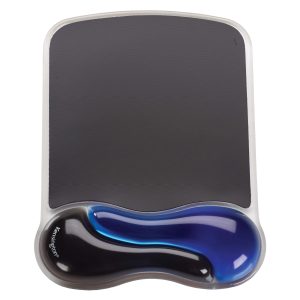
Fix it: Use a wrist rest to keep your wrists neutral (parallel to the floor). This relaxes your shoulders and signals your nervous system to downshift.
How to Fix Your Setup for Better Sleep Tonight
Step 1: Assess Your Sitting Posture
Take a 30-second posture check right now:
- Are your ears aligned over your shoulders?
- Is your lower back touching the chair back?
- Are your feet flat on the floor (or a foot rest)?
- Are your wrists straight while typing?
If you answered “no” to any, your chair is working against you.
Step 2: Elevate Your Screen
Your monitor should be at eye level. Stack books or invest in a monitor stand that supports your screen at the correct height. This eliminates forward head posture and reduces cortisol spikes.
Step 3: Support Your Feet
Dangling feet pull on your lower back and hip flexors. A foot rest keeps your knees at a 90-degree angle, stabilizing your pelvis and reducing lumbar pressure. Bonus: it improves circulation, which helps regulate body temperature for sleep.
Step 4: Add Lumbar Support
If your chair lacks adjustable lumbar support, use a lumbar cushion. It fills the gap between your lower back and the chair, preventing the C-curve that triggers inflammation.
Step 5: Neutralize Your Wrists
A wrist rest keeps your wrists straight and your shoulders relaxed. This reduces upper body tension and improves breathing depth.
Beyond the Chair: Evening Routines That Reset Your Body
The 10-Minute Decompression
After work, spend 10 minutes releasing tension:
- Neck rolls (5 reps each side)
- Cat-cow stretch (1 minute)
- Child’s pose (2 minutes)
- Shoulder shrugs (10 reps)
This signals your nervous system to shift from “work” to “rest” mode.
The 4-7-8 Breathing Reset
Before bed, practice this technique from Dr. Andrew Weil:
- Inhale through your nose for 4 seconds.
- Hold your breath for 7 seconds.
- Exhale through your mouth for 8 seconds.
- Repeat 4 times.
This activates the parasympathetic nervous system, counteracting the cortisol surge from poor posture.
Real Results: What Happens When You Fix Your Chair
Sarah, a 34-year-old remote marketing manager, struggled with insomnia for two years. She tried melatonin, meditation, and even a new mattress. Nothing worked—until she realized her office chair was the problem.
“I added a lumbar support and raised my monitor,” she says. “Within a week, I was falling asleep in 15 minutes instead of two hours. My neck pain vanished, and I woke up feeling refreshed.”
Sarah’s story isn’t unique. A small study from the Journal of Physical Therapy Science found that participants who corrected their workstation posture reported a 31% improvement in sleep quality within four weeks.
Your Sleep Recovery Checklist
| Issue | Symptom | Fix |
|---|---|---|
| Forward head posture | Neck pain, morning headaches | Monitor stand |
| Lower back slouching | Back pain, restless sleep | Lumbar support |
| Wrist extension | Shoulder tension, shallow breathing | Wrist rest |
| Dangling feet | Hip tightness, poor circulation | Foot rest |
Conclusion: Reclaim Your Nights
Your office chair isn’t just a piece of furniture—it’s a gatekeeper to your sleep quality. By fixing your posture during the day, you calm your nervous system, reduce inflammation, and create the conditions for deep, restorative rest.
Start tonight: Adjust your monitor height, add lumbar support, and keep your wrists neutral. Small changes yield big sleep dividends.
Your body spends all day at work. It deserves to recover at night.
“Sleep is the reset button for your brain. Don’t let your chair keep you from pressing it.” — Dr. Matthew Walker
🪑 Fix Your Desk Setup in 5 Minutes
Download the free Ergonomic Setup Checklist — 15 steps to reduce pain and work comfortably.
Get Free Checklist →